Your free business.com+ membership unlocks exclusive tech deals and advisor support
Join Free
BDC Hamburger Icon

Menu

Close
BDC Logo with Name
Search Icon
Search Icon
Advertising Disclosure
Close
Advertising Disclosure

Business.com aims to help business owners make informed decisions to support and grow their companies. We research and recommend products and services suitable for various business types, investing thousands of hours each year in this process.

As a business, we need to generate revenue to sustain our content. We have financial relationships with some companies we cover, earning commissions when readers purchase from our partners or share information about their needs. These relationships do not dictate our advice and recommendations. Our editorial team independently evaluates and recommends products and services based on their research and expertise. Learn more about our process and partners here.

The Best POS Systems for Bars

Bar POS systems like Toast, TouchBistro and CAKE offer features like tab management, drink recipes and real-time reporting for bar operations.

author image
Written by:
Nicole Fallon, Senior Analyst
Editor verified:
Sandra Mardenfeld,Senior Editor
Last Updated Oct 13, 2026
Business.com earns commissions from some listed providers. Editorial Guidelines.
9.6 /10
Editor's rating
Best All-in-One POS System
  • Industry-specific POS plans
  • End-to-end encryption
  • Online pickup order capabilities


Visit Site
Links to Clover POS System
9.5 /10
Editor's rating
Best for Online Ordering
  • Free plan option
  • No commission on online orders
  • Offline mode
Visit Site
Links to Toast
Cake logo
CAKE
9.5 /10
Editor's rating
Best for Efficiency
  • Bill-splitting tool
  • Multiterminal discount
  • 3,000-SKU inventory management
TouchBistro logo
TouchBistro
9.4 /10
Editor's rating
Best for Restaurants
  • Advanced inventory management
  • Table-side ordering/payment tools
  • Customer engagement add-ons
Square logo
Square POS
9.1 /10
Editor's rating
Best for Small Bars
  • Free POS plan available
  • Extensive customization options
  • iPad or POS hardware compatibility
Table Of Contents Icon

Table of Contents

Open row

business.com’s team of experts regularly test, evaluate and compare business solutions to identify the best software and services across industries. These independent investigations involve extensive research, hands-on testing and head-to-head product comparisons. Every review is checked by a top editor to guarantee quality, fairness and accuracy.

In determining the best POS systems for bars, we evaluated platforms on bar-specific needs like fast tab management and splitting, modifier-rich ordering, real-time inventory and pour tracking, offline continuity, and secure, compliant payments. We assessed ease of setup and nightly use, mobile and tableside workflows and reporting that surfaces peak-time performance, menu mix and shrinkage. We compared hardware flexibility, total cost of ownership and integration breadth with accounting, payroll, reservations, delivery and loyalty tools. We favored systems that speed service, cut waste and improve guest experience while scaling from small pubs to multi-location groups. Learn more about our methodology and editorial process.

How We Decided

Tip Bulb

Our team of sales experts and software analysts worked through the POS market with a bar operator’s night in mind, weighing established platforms against newer entrants that might suit a single pub or a growing group. We put weight on the things that decide whether...

MoreMore

Our team of sales experts and software analysts worked through the POS market with a bar operator’s night in mind, weighing established platforms against newer entrants that might suit a single pub or a growing group. We put weight on the things that decide whether a busy Friday runs smoothly: how quickly a tab can be opened, split and closed, how well the system holds up when the internet drops, how granular the pour and inventory tracking gets, and whether age verification and payment security are handled cleanly. From there we shortlisted the strongest candidates for vendor demos, hands-on testing and a close read of real operator feedback before settling on our recommendations.

From local pubs to high-end cocktail lounges, bars around the world depend on point-of-sale (POS) systems to simplify operations, enhance patron experiences and maintain well-organized sales data. The right system can facilitate tab management, streamline the ordering process and even aid in inventory control, thus ensuring that every aspect of the operation runs smoothly and efficiently, even during the busiest shifts.

Searching for the best POS system amid the various options in the market can be overwhelming, so we did the work for you. We’ve carefully curated these top selections based on the criteria most vital to bar owners, including affordability, user-friendliness, hardware choices, software compatibility and mobile functionalities.

112

evaluated

14

researched

5

chosen

Our team of sales experts and software analysts worked through the POS market with a bar operator’s night in mind, weighing established platforms against newer entrants that might suit a single pub or a growing group. We put weight on the things that decide whether a busy Friday runs smoothly: how quickly a tab can be opened, split and closed, how well the system holds up when the internet drops, how granular the pour and inventory tracking gets, and whether age verification and payment security are handled cleanly. From there we shortlisted the strongest candidates for vendor demos, hands-on testing and a close read of real operator feedback before settling on our recommendations.

From local pubs to high-end cocktail lounges, bars around the world depend on point-of-sale (POS) systems to simplify operations, enhance patron experiences and maintain well-organized sales data. The right system can facilitate tab management, streamline the ordering process and even aid in inventory control, thus ensuring that every aspect of the operation runs smoothly and efficiently, even during the busiest shifts.

Searching for the best POS system amid the various options in the market can be overwhelming, so we did the work for you. We’ve carefully curated these top selections based on the criteria most vital to bar owners, including affordability, user-friendliness, hardware choices, software compatibility and mobile functionalities.
112

evaluated

14

researched

5

chosen

From local pubs to high-end cocktail lounges, bars around the world depend on point-of-sale (POS) systems to simplify operations, enhance patron experiences and maintain well-organized sales data. The right system can facilitate tab management, streamline the ordering process and even aid in inventory control, thus ensuring that every aspect of the operation runs smoothly and efficiently, even during the busiest shifts.

Searching for the best POS system amid the various options in the market can be overwhelming, so we did the work for you. We’ve carefully curated these top selections based on the criteria most vital to bar owners, including affordability, user-friendliness, hardware choices, software compatibility and mobile functionalities.
Compare Our Best Picks

BDC Ribbon
Our Top Picks for 2026
Clover POS System
CAKE
TouchBistro
Square POS
Rating (Out of 10)9.69.59.59.49.1
Use case

All-in-one POS system

Online ordering

Efficiency

Restaurants

Small bars

Starting price

$89.95 per month

$0 per month

Requires a quote

$69 per month

Free

Free trial

90 days on select plans

No

None offered

No

30 days for paid plans

Contract length

Three-year contract

Varies by agreement

Monthly plans

Monthly and custom plans

Monthly

POS hardware

Clover Station Solo, Clover Station Duo, Clover Flex, Clover Mini, Clover Go

Toast Flex, Toast Go 3, Toast Flex for Guest, Toast Flex for Kitchen, kiosk (accessories available)

POS terminal, OrderPad for tableside service, self-service kiosk, kitchen display system and payment processing hardware

iPad, kitchen display system, customer-facing display

Register, terminal, stand, handheld and card readers

Integrations

Over 500

200+

18+

25+

400+

Customer support

Phone and email

Phone, chat, online support

Phone, email and web chat

Phone, email, live chat

Phone, email, web chat, social media

Review Link
Scroll Table

Our Reviews

Clover logo
Editor's Rating: 9.6/10
Visit Site
Links to Clover POS System

In our Clover review, we found that the software is the go-to POS system for bar and restaurant owners. It’s a great choice for bar owners who are looking for an all-purpose solution to steer business operations effortlessly. While Clover caters to a variety of industries — including restaurants, retail and e-commerce — it stands out for bars, too, offering an assortment of features that meet bar setups’ unique demands.

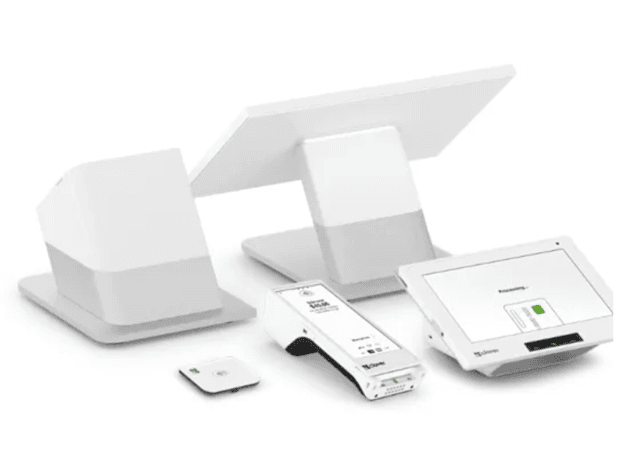
image of Clover’s POS hardware

With Clover’s wide range of hardware, you can create customized checkout stations. There is even a virtual terminal option so you can accept payments without any cards. Source: Clover.

Leveraging its fast and reliable in-house payment processing, Clover goes a step further with distinctive offerings, such as Clover Rapid Deposit and Clover Capital, which are designed to streamline financial operations and foster growth. The system offers convenience for users, streamlining online pickup orders and even integrating with DoorDash to smooth out delivery services.

Clover’s hardware solutions include a virtual terminal that eliminates the need for physical hardware, which is ideal for bars with space constraints. The system also manages invoicing while allowing for secure storage of payment details and enabling recurring payments.

Clover’s POS functions seem virtually limitless. We were impressed with the automatic inventory synchronization, intricate control over pickup and delivery orders and intuitive system to collect marketing preferences and customer contact details, all of which are unified into one platform. Customer engagement is bolstered with rewards and promotional offerings that are bound to keep your patrons coming back.

Clover prices its bar and restaurant systems as bundles that pair a software plan with specific hardware. Most bars will land in one of two tiers depending on whether drinks are ordered at a table or at the counter. Full-service dining plans add table mapping, coursing and split checks; quick-service plans are built around faster counter throughput.

Full-Service Dining Pricing

PlanPriceFinancing OptionFeatures
Starter$1,799 + $89.95/month$179/month for 36 monthsStation Solo 14-inch merchant-facing POS display with POS software
Standard$2,548 + $109.90/month$239/month for 36 monthsStation Solo POS, handheld POS with built-in receipt printer, cash drawer and receipt printer
Advanced$4,447 + $129.85/month$354/month for 36 monthsStation Solo POS, handheld POS, Station Duo POS with 8-inch customer screen, cash drawer and receipt printer

Quick-Service Pricing

PlanPriceFinancing OptionFeatures
Starter$849 + $59.95/month$135/month for 36 monthsMini 8-inch touchscreen POS with built-in receipt printer
Standard$1,899 + $59.95/month$185/month for 36 monthsStation Duo POS, receipt printer and cash drawer
Advanced$2,648 + $79.90/month$245/month for 36 monthsStation Duo POS, Flex handheld POS, receipt printer and cash drawer

Payment processing runs 2.3 percent + 10 cents on cards tapped, swiped or inserted and 3.5 percent + 10 cents on keyed-in transactions. Clover’s best bundle pricing requires a three-year commitment.

  • Clover integrates with DoorDash, which is a big plus for bars that serve food.
  • Clover offers omni-channel menu management, so you can quickly update your online menu page.
  • The virtual terminal lets you take payment without a dedicated register, which helps in bars where counter space is scarce.
  • Clover is more expensive than other POS systems we reviewed.
  • Clover is not compatible with third-party hardware options.
  • Clover requires you to use its own payment processing, so you can't shop your rates to another provider.

On TrustRadius, Clover scores 8.9 out of 10 across more than 40 reviews, with users singling out the quality of its software and hardware, and the product’s ease of use. One reviewer wrote, “One of the main reasons we selected Bypass was because of the quality of the Clover hardware and how clean and sharp the design looks. The Clover hardware, in conjunction with the Bypass software, allowed us to go cashless in our building from day one.”

Toast logo
Editor's Rating: 9.5/10
Visit Site
Links to Toast

Toast is an excellent choice for bar owners looking to improve their online ordering services. The company’s features can help bars and nightclubs streamline their operations and minimize wait times.

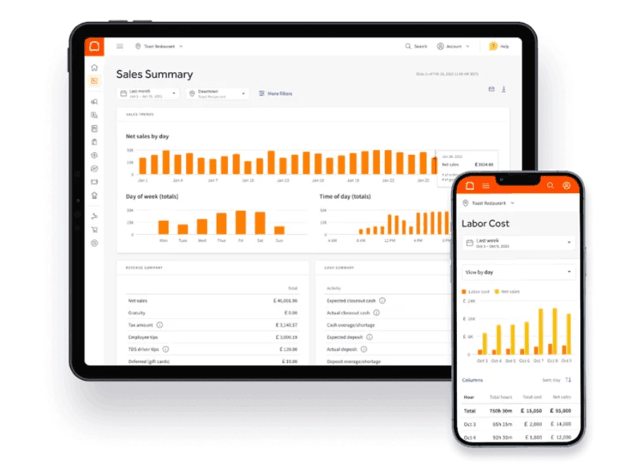
image of Toast’s Sales Summary dashboard

Toast’s Sales Summary can help spot sales trends, and also provides insightful reports. Source: Toast

What sets Toast apart is its zero-commission approach to direct online ordering. With Toast Local and Online Ordering, customers can place orders for pickup or delivery. Toast also offers order throttling, which allows your bar to control the flow of online orders during peak times so your staff can keep up with demand.

Toast also offers order scheduling and curbside pickup, which can streamline your ordering process and improve customer service. You can use Toast Delivery Services to offer delivery through third-party drivers without employing your own delivery staff.

The Toast Order & Pay add-on lets dine-in guests place orders and settle bills directly from their smartphones. Thanks to Toast’s partnership with Google, customers can find your bar through Google Search and Maps and place online orders.

Toast also offers inventory, table and menu management features, as well as detailed reporting and analytics. If you run into any issues, 24/7 chat support is available.

Toast publishes three plans. The Starter Kit carries no monthly software fee but recovers the cost through higher processing rates, so a high-volume bar should run its own numbers before assuming free is cheapest.

PlanPriceFeatures
Starter Kit$0Restaurant-grade hardware, flat-rate payment processing, table and order management, digital menus, mobile payments, guestbook, employee timekeeping, basic scheduling, hardware configuration for one terminal
Point of Sale$69 per monthEverything in the Starter Kit plan, plus custom hardware configuration and a wider selection of add-ons
Build Your OwnCustom quoteChoose your own features

Payment Processing Fees

  • Flat-rate fees vary by agreement
  • Online ordering is commission-free.
  • Toast’s Google integration helps customers find your bar through Google Search and Maps and place online orders.
  • Customers can place orders and settle bills directly from their smartphones.
  • You can’t use a third-party payment processor.
  • Toast’s contract terms vary by agreement, and early termination fees may apply.
  • Toast works only with approved hardware, which may require replacing existing equipment.

Toast holds a score of 8 out of 10 on TrustRadius across more than 50 reviews. Reviewers say that the product is easy to learn and praise the reporting depth and the way offline mode keeps service running through a connection drop. One reviewer commented, “We have tasting room retail locations as well as a kitchen at one location. It’s very user friendly for FOH staff members.”

Cake logo
Editor's Rating: 9.5/10

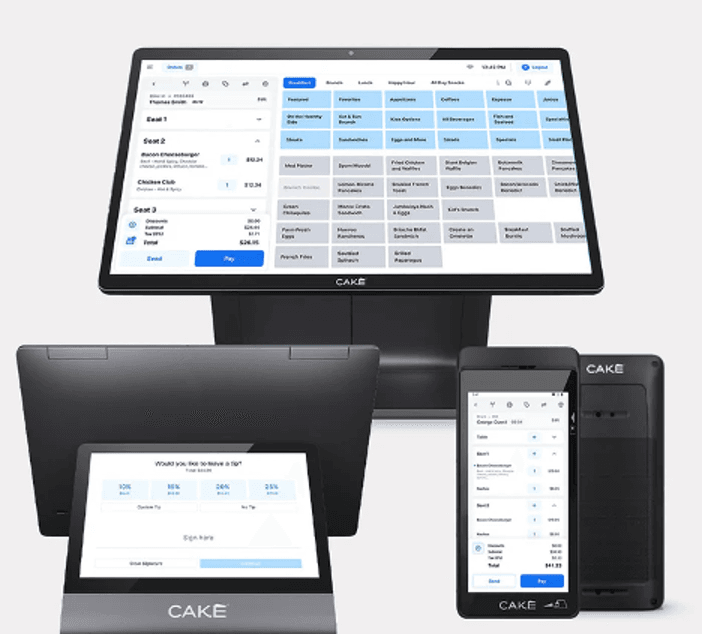
CAKE is an excellent POS system for busy bars that need to prioritize efficiency. In our CAKE review, we found that the software supports a straightforward, smooth experience for both customers and staff. CAKE is exceptionally easy to use — bar owners and employees can master the system in under an hour, which is perfect for training your staff.

Cake POS system

Cake offers a range of easy-to-use POS devices (Source: Cake)

Plus, CAKE provides guests with a layer of transparency that other POS providers don’t have. After customers place an order, they can virtually track their order and ask questions to the host. If they prefer to order in person, they can order and pay through a self-service kiosk or QR code at the table. CAKE also includes a convenient bill-splitting tool, making it easier for large groups to split the tab.

We also like that CAKE’s software is cloud-based, so you can access your data from anywhere. But the software does have an offline mode, so you can continue accepting orders even if your internet temporarily goes down.

CAKE doesn’t publish pricing, so you’ll need to speak with the company directly to get numbers for your bar. Here is how the three tiers are structured.

PlanPriceBest ForFeatures
CoreRequest a quoteSingle-location barsPOS terminal, payment processing, reporting and analytics
GrowthRequest a quoteGrowing operationsOnline ordering, loyalty tools, AI reporting, premium support
ScaleRequest a quoteMulti-location groupsEnterprise integrations, dedicated account management, advanced reporting
  • No separate software bill: CAKE runs a “$0 Down. No Bill. Ever.” model, bundling software, hardware, support and updates into the package rather than charging a monthly subscription line item.
  • Processing carries the cost: Revenue comes through CAKE Payments instead of a software fee, which puts processing rates at the center of what you actually pay.
  • Volume decides the value: A quiet neighborhood bar may do well skipping a monthly fee. A high-volume venue should model the processing rates carefully before concluding it’s the cheaper route.
  • Quotes are tailored: What you pay depends on size, transaction volume and which features you need.
  • The setup is extremely simple and straightforward, so your bar staff can be up and running quickly.
  • CAKE’s bill-splitting tool makes it easy for groups to split their bar tab.
  • Guests can order online and track their orders in real time.
  • CAKE’s daily management reports may not have as much detailed or useful information as reports from other POS providers.
  • CAKE publishes no pricing, so you can’t see what a system will cost without going through a sales conversation.
  • Several of the tools a busy bar would want, including loyalty and marketing modules, are reserved for the top tier or sold as add-ons.

CAKE has little presence on major third-party review platforms — it carries no ratings on TrustRadius. That isn’t a mark against the product so much as a reflection of its size, but it does mean there is less independent feedback. If you are considering CAKE, lean more heavily on a demo.

TouchBistro logo
Editor's Rating: 9.4/10

TouchBistro is a restaurant-focused POS system that works well for bars that also serve food, along with clubs, breweries, food trucks and quick-service spots. Built specifically for the food and beverage industry, it helps streamline order taking, payments and overall operations.

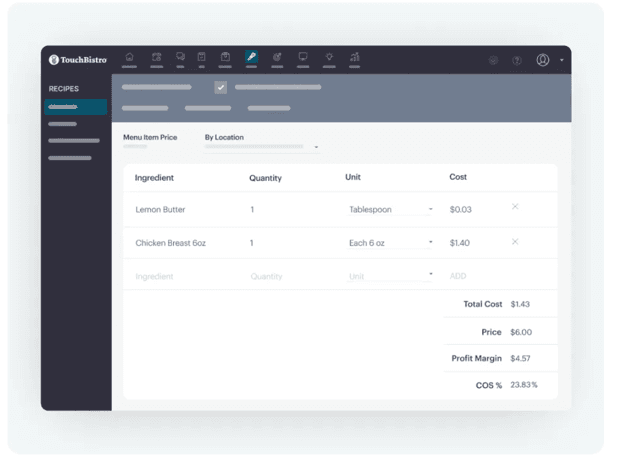
image of TouchBistro dashboard

TouchBistro offers inventory management tools that can help you track stock costs and profitability. Source: TouchBistro

The system runs on iPads, letting staff take orders and process payments right at the table. You can choose TouchBistro Payments or connect with a third-party payment processor to accept payments.

TouchBistro makes table and menu management simple with drag-and-drop tools and customizable dashboards. It also supports ingredient-level inventory tracking and recipe modifiers to keep food prep consistent. For customer engagement, you can track order history, manage balances, and add optional features like online ordering, reservations and loyalty programs.

On the staff side, managers can build employee profiles, set roles and manage staff more efficiently. TouchBistro also includes more than 50 detailed reports to give you a clear view of your bar’s performance. Support is available 24/7 via phone, email and live chat so help is always on hand when you need it.

TouchBistro publishes pricing for its core plans, though a custom configuration or add-on products require a quote.

PlanPriceFeatures
Point of Sale$69 per monthMenu management; reporting and analytics; floor plan and table management; staff management
Essentials Bundle$119 per monthEverything in the Point of Sale plan, plus integrated payments and restaurant-grade hardware
Custom SetupCustom quoteCustomized POS configuration, hardware, integrations and additional management tools

Add-on products priced by quote include online ordering, reservations, loyalty, marketing, gift cards, a kitchen display system, inventory management, labor management and profit management. Payment processing uses a cost-plus model.

  • Bars that serve food can take advantage of TouchBistro’s extensive restaurant-specific features.
  • TouchBistro’s mobile-friendly software runs on iPads for tableside ordering and payments.
  • Extensive back-office reporting, with more than 50 built-in real-time reports, gives bar owners deep business insights.
  • The advanced customization features may not be necessary for every bar and might hinder the setup process.
  • iPad-only compatibility limits hardware flexibility — there’s no Android or desktop support.
  • Many advanced features require paid add-ons, which can increase your monthly costs.

TouchBistro holds a score of 6 out of 10 on TrustRadius across more than 20 reviews, the lowest on this list. Reviewers who rate it well point to reliability — one noted the system kept working without the issues they’d hit with alternatives — and to how easily staff learn the iPad interface. The lower scores tend to come from operators frustrated by the iPad-only hardware requirement and by how quickly costs climb once add-on modules are layered on. One reviewer said, “For a small business like ours, it works very well, is very user friendly, but the cost to add more tablets so that we can keep one at the bar, one on the interior dining area and one on the outside dining area is difficult as they have to be iPads, and there is an additional cost to add another tablet for use on the floor.

Square logo
Editor's Rating: 9.1/10

Square is an excellent choice for small bars that want an affordable, all-in-one POS system. Square offers a free plan, and you can get started with an iPad or choose from its own POS hardware options.

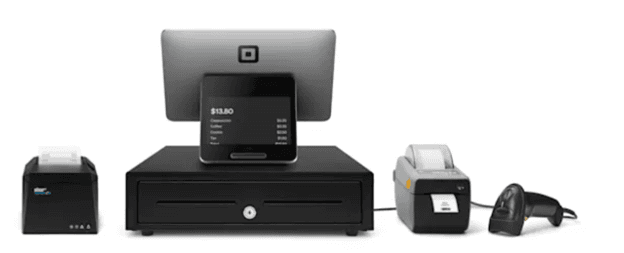
image of Square’s complete retail POS kit

Square can offer you easy-to-use mobile credit card readers as well as other hardware like its complete retail POS kit. Source: Square

One of the biggest advantages is that Square’s POS software doesn’t have any monthly fees on the Free plan. You’ll pay processing fees when you accept payments, while Plus and Premium plans add more advanced features for a monthly fee. Square’s POS ecosystem is built around its own payment processing service, which may not suit businesses that want more processor flexibility.

Square also offers strong customization tools. You can manage your team and payroll, set up loyalty programs, sell gift cards and run marketing campaigns from one easy-to-use platform.

If you want to grow your bar’s online presence, Square has e-commerce features, invoicing tools and a mobile app for iOS and Android devices. You can also accept contactless payments and close out tabs quickly — must-have features during busy shifts.

Square includes 400+ app integrations, and support is available via phone, email or chat if you need help. Overall, it’s a flexible, intuitive system that can grow alongside your business.

Square runs three subscription tiers. The Free plan has no monthly cost, while the paid tiers add business management tools and progressively lower in-person processing rates.

PlanPriceFeatures
Square Free$0 per monthPayment processing, POS app, online selling, invoicing, booking, basic inventory tools, Square Banking
Square Plus$49 per month per locationEverything in Free, plus advanced POS features, staff management, loyalty tools, email and text marketing, lower processing rates
Square Premium$149 per month per locationEverything in Plus, plus advanced business tools, 24/7 phone support and Square’s lowest standard in-person processing rate

Payment Processing Fees

  • In person: 2.6 percent + $0.15 on Free, 2.5 percent + $0.15 on Plus, 2.4 percent + $0.15 on Premium
  • Manual entry or card on file: 3.5 percent + $0.15 on all plans
  • Square’s free plan covers the essentials a small bar needs, with no monthly software cost to carry through slow months.
  • Contactless payments make closing out tabs fast, which matters most during a rush.
  • Team management, payroll, loyalty, gift cards and marketing all run from the same platform, so a small operation can avoid stitching together separate tools.
  • Square doesn’t work with third-party payment processors and requires all payments to go through its in-house system.
  • Some advanced POS and industry-specific features require a Plus or Premium subscription.
  • Flat-rate processing may cost a high-volume bar more than an interchange-plus arrangement would.

Square carries a TrustRadius score of 9 out of 10 across more than 90 reviews. Many praise its ease of use, its real-time updates and customization options. One user said, “Square POS is instrumental in all day to day operations of my business. It allows for seamless payments and helps maintain the quality experience our clients expect from all of our services. It’s easy to use terminal and well thought UI facilitates efficient transactions with very high levels of accuracy.”

Pricing for Bar POS Systems

In recent years, the landscape for POS systems has undergone substantial transformations, driven by technological advancements and a general downward trend in pricing. What once required a substantial investment in hefty equipment can now be achieved with much simpler, streamlined solutions, such as tablet interfaces or smartphone attachments. This evolution has opened up new avenues, making POS systems financially and logistically attainable for establishments ranging from small local taverns to expansive bar chains.

The exact cost of installing a POS system in your bar can depend on a variety of factors, including the specific hardware and software options offered by the provider. Cloud-centric configurations may involve monthly fees, which could range from nominal to over $200. Hardware costs could reach $1,200 for a top-tier register setup, which might include elements such as a credit card processor, digital signature tools and a receipt issuer. Conversely, a simpler approach might require only a card reader to function with existing mobile technology, thereby minimizing overhead.

FYIDid you know
Going with a mobile POS system? Make sure the provider’s app works with the mobile device and operating system you plan to use.

As you choose a POS system for your bar, it’s important to keep in mind the potential return on investment and long-term business impact. It’s not just about the upfront cost; it’s about choosing a system that will improve efficiency and foster a better customer experience, which can increase your bar’s profitability in the long run.

Features of Bar POS Systems

Most POS systems provide essential functionalities, but not all of the leading options cater to the specific needs of bars. Identifying the key features that are essential for your bar will allow you to discover the right POS solution tailored to your requirements.

These key POS system features should factor into your decision:

Hardware

POS hardware can vary greatly depending on your bar setup. Before you invest in a POS provider, ensure that it offers all of the hardware you’d like to include in your configuration. At a bare minimum, you will need a card reader and mobile device, but you will likely also have to invest in other hardware, like a cash register, receipt printer, signature capture device and display screen.

Inventory management

Bars need to track a variety of products, such as beer, liquor, wine, nonalcoholic beverages and sometimes food. Choosing a POS system with strong inventory management means you can get real-time updates on product stock levels and track your bestsellers. This way, you can avoid overstocking something that is going to sit on the shelf or understocking your regulars’ favorite beverages.

Reporting

The POS system you choose should offer extensive reporting features and analytics to help you understand employee performance, sales trends, inventory and other useful data. These POS reports can help you make data-driven business decisions that improve your bar’s long-term performance.

Did You Know?Did you know
Data analytics are a must for modern business owners. The right POS system can give you a better understanding of your bar’s financial health by offering a window into your sales patterns.

Integrations

Your bar likely uses tools such as an accounting system, marketing software and CRM software. The top POS providers integrate with the tools you’re already using and share data with one another so you can streamline business operations and get a more holistic picture of your company’s health.

Mobile apps

POS mobile apps allow you and your employees to conduct transactions from anywhere, whether you’re moving from table to table at your establishment or pouring drinks at a community event. A mobile app for your POS system can speed up the checkout process and reduce lines, thereby enhancing the overall customer experience.

How to Choose a Bar POS System

Not sure how to begin selecting the right POS system for your bar? Follow these steps to make an informed decision based on your needs.

1. Evaluate your hardware and software requirements.

Start by figuring out what your bar really needs. If you have a small, casual bar, you probably just need something simple and affordable. But if your place is bigger or you have many bars or locations, you’ll need a more advanced system. Think about how many sales you make, how you want to track your stock, how you plan to connect with customers and if you have multiple bars whose sales you need to track.

2. Research the best POS systems for bar owners.

Looking at online reviews of POS systems that bar owners recommend can help you narrow down your options. Pages such as this one offer a more detailed look at each system, allowing you to compare them side by side to choose the best one.

3. Take advantage of demos and free trials.

Once you’ve picked a few POS systems you’re curious about, try them out if you can. Many companies let you try their products for free or show you how they work with an online demonstration. Testing them helps you find the one that’s both useful and easy for your bar staff to use.

4. Talk to vendors directly.

POS system providers should be able to give you more information that might not be clear from their ads. Contact each of your top choices directly and ask how the platform would fit your bar’s needs. It’s also wise to inquire about costs, agreements and any parts of the system you’re not sure about.

5. Weigh the pros and cons of your top choices.

After you check out product demos and talk to individual vendors, look at your top choices and decide which will provide the best long-term value for your bar. Think about the price and any extra charges, like fees per sale. Also, consider whether the system can handle your bar’s future growth. Pick a POS system that fits your bar now but can also scale with your business so you don’t have to start over in the future.

Benefits of a Bar POS System

A POS system designed with bar owners’ needs in mind can boost operational efficiency and improve the customer experience. Here are a few key benefits you’ll enjoy with the right POS system for your bar:

Increased speed and efficiency

On busy nights, speed is crucial. A bar-focused POS system facilitates rapid transactions, allowing your staff to serve more customers in less time. Integrated systems can streamline the ordering process, making it easy to add or modify orders directly from a tablet or mobile device.

Streamlined inventory management

An intuitive POS system can be a huge help with inventory management as you keep track of the stock levels of various liquors, mixers and other supplies. This means you can easily identify when it’s time to reorder products and, in turn, prevent potential revenue loss and minimize waste.

Enhanced customer experience

A specialized POS system can substantially improve the customer experience. A modern POS system can accommodate a range of payment preferences, such as simplifying bill splitting for larger parties or facilitating contactless payments, thereby ensuring a smooth and satisfying end to your patrons’ visit.

Detailed reporting and insights

With a robust POS system, bar owners can access a treasure trove of data and insights, including sales reports, most ordered drinks and customer preferences. This data can guide business decisions by helping you tailor your services and offerings based on customer behaviors and preferences.

Greater flexibility and scalability

A good POS system will grow with your business. Modern systems are designed to be scalable, allowing you to easily add new features and integrations as your needs evolve.

Bottom LineBottom line
The right POS system for your bar offers the functionality you need at a price you can afford right now, while leaving room to scale with your business.

What Are Some Alternative Bar POS System Options?

Our top picks suit most bars, but the three systems below are worth a look if none of them fit your setup.

Lightspeed

Lightspeed offers an entry-level restaurant plan including a pre-authorization bar mode, which lets staff hold a card against an open tab rather than running it repeatedly through the night. Restaurant plans run from $69 per month at the Starter tier up to $399 per month for Premium, with an Enterprise option priced by quote. Even the entry plan covers menu management, floor plans, takeout and delivery, CRM and loyalty. Note that payment processing options and rates vary by plan. Our Lightspeed review has the full breakdown.

Global Payments Genius POS

Genius POS is built around throughput, which makes it a reasonable fit for high-volume bars and nightclubs. Scan-to-order and scan-to-pay let patrons order from where they’re standing, handheld devices move service away from the bar rail and an offline mode keeps registers running through a connection drop. Unlike the iPad-only options on this list, Genius runs on both iOS and Android hardware. Pricing is quote-based, and you must use Global Payments for processing. See our Global Payments Genius POS review for more.

Epos Now

Epos Now serves both retail and hospitality, and its hospitality build covers breweries, pubs and quick-service venues. The thing that distinguishes it from most of our top picks is processor flexibility: you can use Epos Now Payments or connect a third-party processor, which gives a bar room to renegotiate rates later rather than being locked in. Hardware options are broad, including touchscreen terminals, iPads and Android tablets. Read our Epos Now review to learn more.

Methodolody

To determine the best POS systems for bars, our team of sales experts and software analysts started from the full field of point-of-sale platforms serving the food and beverage industry, then narrowed it to the systems with genuine bar capability rather than restaurant software with a drinks menu bolted on. From there, our hands-on testing, vendor demos and research into real operator experiences produced the five recommendations on this page.

Our evaluation centered on what actually determines whether a bar runs well on a busy night. We looked at how quickly a tab can be opened, transferred, split and closed, and whether the system supports card pre-authorization for open tabs. We assessed modifier-rich ordering, since a cocktail order carries more variation than a plated entree, and we examined inventory tracking at the pour level, where shrinkage quietly erodes margin. We tested offline continuity, because a dropped connection during a rush is a revenue problem, not an inconvenience. We also weighed age verification and payment security, hardware durability in a wet environment, and how each system handles tipping and tip-out reporting.

These factors were weighted differently in our overall conclusion. The weights were determined based on how much business owners prioritize these criteria when shopping for business software and services and making purchasing decisions.

  • Pricing (30 percent): We compared each vendor’s plans and judged which packages offered the best value, taking into account monthly software fees, credit card processing rates, equipment charges and the cost of add-on services like loyalty programs and gift cards.
  • Features (25 percent): We looked for core bar POS functions including tab and check management, modifier handling, inventory tracking, employee management and reporting, and awarded extra points for advanced capability such as pour-level tracking and integrated age verification.
  • Ease of use (25 percent): We tested the hardware and software ourselves, gauging each solution’s learning curve and customization options, with particular attention to how quickly new bar staff could be trained and how the interface holds up under volume.
  • Customer service (20 percent): We evaluated the range of support options, including whether phone assistance is available on every tier and whether support hours cover late-night operating windows, along with each vendor’s self-guided help resources.

Based on these criteria, we determined not only which bar POS systems our readers could trust but also the ways in which each solution best serves different kinds of venues. Those takeaways informed the “Best for” use cases you see on this page.

To learn more about our methodology, see our full editorial process.

Bar POS System FAQs

When you’re considering a POS system for your bar, look for features such as inventory management to track your stock levels, seamless integration with mobile devices for quick and efficient service, the ability to easily split bills to enhance the customer experience, and detailed sales reporting to better understand your business’s dynamics.

A POS system can expedite the ordering and payment process, thereby reducing wait times and preventing errors. Additionally, modern POS systems can facilitate contactless payments and easy bill splitting to efficiently accommodate customers’ needs.

Yes, reliable POS systems are designed to be secure and adhere to regulatory standards, including PCI compliance for payment security. They can also assist in age verification processes to protect your business from legal issues.

Many contemporary POS systems are designed to be compatible with a range of hardware and software setups. Confirm your prospective POS system’s compatibility to ensure it can integrate seamlessly with your existing infrastructure.

A POS system can streamline inventory management by monitoring stock levels in real time, sending alerts for low-stock items and providing detailed reports on inventory usage.

Did you find this content helpful?
Verified CheckThank you for your feedback!
author image
Written by: Nicole Fallon, Senior Analyst
Nicole Fallon brings a wealth of entrepreneurial experience to business.com with nearly a decade at the helm of her own small business. She and her co-founder successfully bootstrapped their venture and now oversee a dedicated team. Fallon's journey as a business owner enables her to provide invaluable insights into the intricacies of the startup process and beyond, along with guidance in financial management, workplace dynamics, sales and marketing, and more. At business.com, Fallon covers technology solutions like payroll software, POS systems, remote access and business phone systems, along with workplace topics like employee attrition and compressed schedules. Beyond her personal entrepreneurial endeavors and business.com contributions, Fallon is skilled at offering macro-level analysis of small business trends as a contributor to the U.S. Chamber of Commerce. Her observations have also been published in Newsweek, Entrepreneur and Forbes, showing she's a trusted voice in the business world. Fallon's collaborative spirit extends to partnerships with B2B and SaaS companies, where she lends her expertise to drive innovation and sustainable growth. Her multifaceted experiences converge to offer a holistic perspective that resonates with budding entrepreneurs and industry leaders alike.