Your free business.com+ membership unlocks exclusive tech deals and advisor support
Join Free
BDC Hamburger Icon

Menu

Close
BDC Logo with Name
Search Icon
Search Icon
Advertising Disclosure
Close
Advertising Disclosure

Business.com aims to help business owners make informed decisions to support and grow their companies. We research and recommend products and services suitable for various business types, investing thousands of hours each year in this process.

As a business, we need to generate revenue to sustain our content. We have financial relationships with some companies we cover, earning commissions when readers purchase from our partners or share information about their needs. These relationships do not dictate our advice and recommendations. Our editorial team independently evaluates and recommends products and services based on their research and expertise. Learn more about our process and partners here.

Best Multi-Line Business Phone Systems

The best multi-line phone systems below connect businesses and customers even at peak call hours, driving sales and satisfaction.

Jessica Elliott
Written by:
Jessica Elliott, Senior Analyst
author image
Editor verified:
Gretchen Grunburg,Senior Editor
Last Updated Sep 21, 2026
Business.com earns commissions from some listed providers. Editorial Guidelines.
9.1 /10
Editor's rating
Best for Small Businesses
  • Starting price of $19.95 per user, per month
  • Analog device support
  • Intuitive user interface
Visit Site
Links to Ooma Office
ringcentral logo
RingEX
8.9 /10
Editor's rating
Best for Collaboration
  • Starting price of $20 per user, per month
  • Interactive collaboration spaces
  • AI video conference summaries
Image related to the service.
Nextiva
8.5 /10
Editor's rating
Best for Multisite Retail and Healthcare
  • Starts at $15 per user, per month
  • Multi-location support
  • AI voicemail transcription
Image related to the service.
Dialpad Connect
8.8 /10
Editor's rating
Best for Voice Intelligence
  • Starts at $15 per user, per month
  • AI voice and video insights
  • Data visualization tools
GoTo Connect company logo
GoTo Connect
8.6 /10
Editor's rating
Best for Remote Teams
  • Pricing by request
  • Flexible routing and device options
  • AI video meeting highlights
Table Of Contents Icon

Table of Contents

Open row

business.com’s team of experts regularly test, evaluate and compare business solutions to identify the best software and services across industries. These independent investigations involve extensive research, hands-on testing and head-to-head product comparisons. Every review is checked by a top editor to guarantee quality, fairness and accuracy.

In determining the best multi-line business phone systems, we looked for platforms that could handle high call volumes while offering advanced routing, queue management and call distribution features. We tried a number of systems to gauge their ease of setup, call quality and ability to manage multiple lines across teams or departments. We favored vendors that offered flexible user licensing, robust administrative controls and scalable solutions that could grow with expanding businesses. Learn more about our methodology and editorial process.

How We Decided

Tip Bulb

How We Decided

We started from the same pool of 75 business phone platforms we track across the category, then filtered for systems built to handle several simultaneous calls on a single number rather than simple one-line service. We researched 20 of them closely, testing how...

MoreMore

We started from the same pool of 75 business phone platforms we track across the category, then filtered for systems built to handle several simultaneous calls on a single number rather than simple one-line service. We researched 20 of them closely, testing how quickly we could stand up extensions and ring groups, how cleanly calls distributed across a team, and how much administrative control each portal gave a non-technical owner. We favored platforms with flexible licensing, so a business paying for five lines today can easily scale to eight next quarter.

75

evaluated

20

researched

5

chosen

We started from the same pool of 75 business phone platforms we track across the category, then filtered for systems built to handle several simultaneous calls on a single number rather than simple one-line service. We researched 20 of them closely, testing how quickly we could stand up extensions and ring groups, how cleanly calls distributed across a team, and how much administrative control each portal gave a non-technical owner. We favored platforms with flexible licensing, so a business paying for five lines today can easily scale to eight next quarter.

75

evaluated

20

researched

5

chosen

Multi-line phone systems help businesses manage multiple calls at once without leaving customers waiting or overwhelming employees. Today’s systems go well beyond traditional phone lines, with features like call routing, auto attendants, ring groups and queues that direct callers to the right person or department. Many also bring messaging, video meetings and team collaboration into the same platform, giving employees more ways to communicate whether they’re in the office or working remotely.

The need for flexible business communications remains widespread. Research firm Metrigy found that 32.7 percent of businesses use multiple phone system types, including UCaaS. We researched 20 Voice over Internet Protocol (VoIP) platforms to identify the best multi-line phone systems for different business needs, from small companies to multi-location organizations and remote teams.

Compare Our Best Picks

BDC Ribbon
Our Top Picks for 2026
Ooma Office
RingEX
Nextiva
Dialpad Connect
GoTo Connect
Rating (Out of 10)9.18.98.58.88.6
Best Use Case

Best for Small Businesses

Best for Collaboration

Best for Multi-site Retail and Healthcare

Best for Voice Intelligence

Best for Remote Teams

Free Trial

30-day money-back guarantee

14 days

Demo available

14 days

14 days

Monthly Price

$19.95 to $29.95 (Customized pricing available)

$30 to $45

$23 to $75

$27 to $35 (Customized pricing available)

Quote required

Annual Price

Not offered

$20 to $35

$15 to $75

$15 to $25 (or custom)

Quote required

Text Message Limits

250 to 1,000

25 to 200 per user

100 to unlimited

250 outbound included per user/month

Not published

Included Toll-Free Minutes

500

100 to 10,000

2,000 to 10,000

None

1,000

Number of Video Meeting Participants

25 to 100

Up to 300

25 video (250 total with audio dial-in)

150

250

SSO on Base Plan

No

Yes

Yes (additional fee may apply)

Yes

Yes

Voice or Video AI Features

Yes (Pro Plus)

Yes

Higher tiers or add-on

Yes

Yes

Review Link
Scroll Table

Our Reviews

Editor's Rating: 9.1/10
Visit Site
Links to Ooma Office

Ooma is our top choice for small businesses because of its straightforward pricing, preconfigured IP phones and non-technical user interface. We pointed out in our Ooma review that business owners can quickly set up custom greetings and company hours for the virtual receptionist using Ooma’s drop-down menus. No professional phone administrator is needed. Whereas RingCentral puts fax capabilities on its Advanced plan, Ooma includes it with all subscriptions.

Ooma is also a great solution for companies still using some analog devices, because you can plug an adapter into your overhead paging system or fax machine to continue using them. Yet Ooma has over 100 modern communications features with every plan. We liked that Ooma provides on-hold and call transfer music, or you can upload your own. The iOS and Android mobile apps allow call flip, transfer and simultaneous ring.

We were particularly impressed with Ooma’s AI tools. Pro Plus includes AI Transcriptions, which turns recorded calls into searchable transcripts and summaries, as well as AI Insights for analyzing call topics, trends and customer sentiment. Businesses can also add Ooma’s AI Answering Service to any plan. It answers missed calls, responds to common questions, collects caller information and provides a recording, transcript and summary for follow-up. For businesses that want more extensive automation, the AI Receptionist can answer calls 24/7, route callers and schedule appointments.

Like other multi-line systems, Ooma’s higher tiers include video meetings and call queues. For Pro plan users, we found the scheduled text messaging options, text templates and website widget most helpful to small teams managing multiple communication channels. Ooma also has Enterprise plans with advanced features, such as an interactive voice response (IVR) system and skills-based routing.
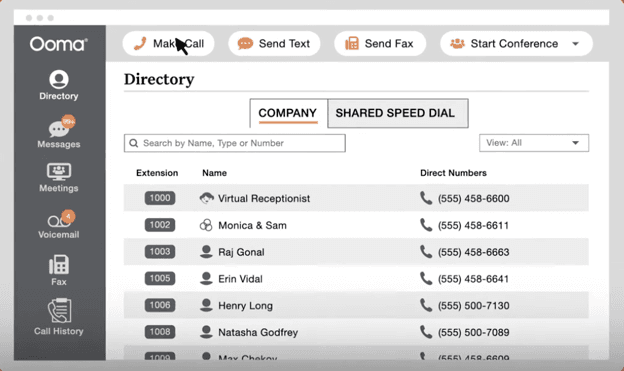
Ooma Office directory showing business extensions, direct phone numbers and the virtual receptionist

Ooma Office lets businesses manage multiple extensions and direct numbers from a central directory, with a virtual receptionist to help route incoming calls. Source: Ooma

Note that Ooma’s plans are month-to-month with no contract, so there’s no discounted annual rate.

Ooma Office PlansMonthly Price (Per User)Annual Price (Per User, Per Month)Key Features
Essentials$19.95N/AUnlimited calling in the U.S., Canada, Mexico and Puerto Rico; virtual receptionist; ring groups; call park; call flip; overhead paging and intercom; analog and virtual fax; mobile app; more than 100 standard features
Pro$24.95N/AEverything in Essentials, plus: desktop app; text messaging; video meetings with 25 participants; call recording; voicemail transcription; dynamic caller ID; advanced call blocking; messaging templates
Pro Plus$29.95N/AEverything in Pro, plus: call queues; find me, follow me; video conferences with 100 participants; expanded virtual receptionist; CRM, QuickBooks and Square integrations; hot desking; online bookings; Ooma AI Transcriptions and AI Insights
EnterpriseCustomN/AEverything in Pro Plus, plus: SIP trunking; Microsoft Teams Direct Routing; contact center features
  • When setting up the multi-line phone system, it is easy to navigate the settings to configure extensions, update the virtual receptionist or add new users.
  • Ooma Office provides a toll-free number and company number with all business accounts, and all users receive a direct dial number.
  • Small businesses can set up ring groups and upload custom hold music without having technical experience.
  • Ooma does not offer discounted annual pricing.
  • The entry-level subscription lacks video conferencing and text messaging tools.
  • Ooma's small business phone system has fewer remote collaboration tools than competitors.

TrustRadius: 6.6/10

“Ooma Office is our primary office phone. While we have old-school office phones, we primarily use them on our mobile devices with the Ooma Office app, allowing us to ‘be in the office’ from anywhere. It’s a full-featured solution for a very reasonable price,” one user wrote.

Trustpilot: 3.5/5

“About once a month, sometimes more, the handheld phones will stop functioning and say ‘searching for base unit.’ We then have to [un-register] the phones then [re-register] them to the base unit to regain use of the phones,” one user wrote.

ringcentral logo
Editor's Rating: 8.9/10

RingEX is RingCentral’s unified communications platform with a 99.999 percent SLA (service-level agreement) uptime. Aside from advanced call management capabilities, RingCentral provides AI-powered video conferencing tools and robust messaging and task management software. Rich integrations and interactive features allow staff, stakeholders and clients to engage in real time. Consequently, RingCentral is our top pick for the best multi-line business phone system for collaboration.

We liked that RingCentral provides video capabilities with all subscriptions, including breakout rooms, recording and AI meeting insights. Ooma does not have video conferencing on its base plan, while RingCentral supports video meetings with up to 300 participants. Teams can share documents easily with cloud storage integrations (Dropbox, OneDrive, Box, Google Drive and more). Even better, you can search by file type or keyword to quickly locate files or conversations.

Our in-depth review of RingCentral explains how whiteboards and team huddle features help teams work together. We also discuss the multi-line system’s ease of use, pointing out that RingCentral’s web and phone apps provide consistent user experiences. These factors make it easier for clients and employees to focus on the task instead of fiddling with app settings.

RingCentral video meeting with multiple participants collaborating on a shared whiteboard

RingEX’s collaborative whiteboard lets meeting participants work together visually while on a video call. Source: RingCentral

PlanMonthly Price (Per User)Annual Price (Per User, Per Month)Key Features
Core$30$20Unlimited domestic calling in the U.S. and Canada; multi-level auto attendant and IVR; AI assistant for phone and video; on-demand call recording; team messaging; unlimited audio conferencing; video meetings; 25 business SMS per user, per month; 100 toll-free minutes; visual voicemail; single sign-on; API access
Advanced$35$25Everything in Core, plus: automatic call recording; advanced call queues; call monitor, whisper and barge; hot desking; CRM and industry-specific integrations; unlimited internet fax; multi-site administration; Business Analytics Essentials; 100 business SMS per user, per month; 1,000 toll-free minutes
Ultra$45$35Everything in Advanced, plus: unlimited cloud storage; webinars with 500 attendees; Business Analytics Pro; device analytics and alerts; AI translation, writing and editing tools; 200 business SMS per user, per month; 10,000 toll-free minutes
Customer Engagement BundleCustom pricingCustom pricingEverything in Ultra, plus: Business SMS Booster (shared SMS inbox, reply templates, compliance and analytics); Call Queues Booster (wait-time announcements, callback from queue and live reports)

RingCentral advertises savings of up to 33 percent for paying annually. Volume pricing is negotiated rather than published.

  • Business users can interact with internal and external contacts in group chat spaces and organize messages by project, team or task.
  • Built-in task management tools support file attachments, color labels and status updates.
  • Every plan includes video meetings and AI call and meeting summaries.
  • RingCentral limits text messaging to 25 to 200 SMS segments per user, per month, depending on the plan, which may not be enough for businesses that text heavily.
  • RingEX's advertised $20 starting price requires annual billing; the Core plan costs $30 per user with month-to-month billing.
  • Automatic call recording and some advanced integrations require a higher-tier plan.

TrustRadius: 8.8/10

“RingCentral is used for all our business client calls and for some intra-organizational messaging. Because we have the app on our mobile phones, it comes in handy when we are on the move, which means fewer missed calls and communications,” one user wrote.

Trustpilot: 1.7/5

“While the phone service is satisfactory and they have some neat features, they care nothing about their customers. I have ported my number out but still have to pay for services I am not using,” one user wrote.

Editor's Rating: 8.5/10

Nextiva nails the essentials with its cloud-based multi-line phone system, but its deployment-ready solutions for accepting payments and maintaining patient confidentiality set it apart from competitors. These factors and its intuitive, scalable tools for managing omnichannel communications make Nextiva our top choice for retailers and healthcare practices with multiple sites.

For HIPAA-compliant accounts, Nextiva turns off or limits certain features to help protect private patient data. Nextiva also offers a PCI-certified secure payment solution that uses IVR to collect customers’ card information without exposing the details to the agent.

When evaluating features for our Nextiva review, we were impressed with its ease of use. Multi-site businesses can route calls between sites or configure rules for each branch. You can assign employees from any location to manage digital communications, like emails or social media messages from shared inboxes. With flexible, centralized control, retail and healthcare owners can oversee and scale communications across physical and online locations.

Nextiva call flow routing incoming calls based on business hours

Nextiva’s call flow builder lets businesses customize how incoming calls are routed to teams, voicemail and other destinations. Source: Nextiva

PlanMonthly Price (Per User)Annual Price (Per User, Per Month)Key Features
Core$23$15Unlimited calling; auto attendant; voicemail transcription; team messaging and video meetings; basic call routing; Nextiva app for desktop and mobile
Engage$50$25Everything in Core, plus: SMS, email and social media messaging; live chat and chatbot tools; higher messaging limits; expanded integrations; enhanced reporting and analytics
Scale$75$75Everything in Engage, plus: skills-based and priority routing; built-in call center features; AI-powered transcription and summaries; advanced analytics and reporting; higher usage limits across channels
  • Nextiva's multi-line call handling makes it easy to transfer calls between offices, remote users or extensions.
  • Nextiva's centralized email, webchat and social messaging tools help companies build relationships with potential shoppers or patients.
  • Businesses save time and resources by adding, updating and editing devices for all locations in the Nextiva admin app.
  • Some integrations require add-ons, including Salesforce, HubSpot and other CRM integrations.
  • AI features like transcription and summaries are limited to higher-tier plans or add-ons.
  • The advertised $15 Core price requires annual billing; month-to-month service costs $23 per user.

TrustRadius: 8.2/10

“Round robin was super easy to get set up, and the team was very helpful throughout the onboarding process,” one user wrote.

Trustpilot: 4.5/5

“We have been using the new Nextiva One platform for several months and really enjoy it. The ability to have access to your ‘phone’ on any device has been great. Customer service has been very responsive,” one user wrote.

Editor's Rating: 8.8/10

Dialpad Connect offers excellent annual billing discounts and a feature-rich base plan, making it a popular multi-line phone system for small business sales and service teams. Standard packages start at $15 per user monthly with annual billing and include intelligent call routing, analytics, charting and conversation histories.

During testing for our Dialpad review, we were impressed with DialpadGPT, the VoIP provider’s proprietary large language model built specifically for business conversations. Dialpad’s unique tools and AI capabilities make it the best multi-line phone system for voice intelligence.

Dialpad’s data visualization tools include graphs and charts alongside many other reporting features, allowing leaders to drill down into communications. Business owners and VoIP administrators can review call routing workflows to reduce inefficiencies. Sales and service managers can use keyword filters to understand which topics or competitors callers discuss the most. We also appreciate that Dialpad AI surfaces insights from video meetings. Teams can focus during conferences and take swift action afterward by clicking on AI-generated action items to create a calendar event.

However, we were most impressed with the call journey feature. It records every action a call takes from beginning to end, allowing leaders to uncover insights into call routing and customer experiences. In addition, employees can turn on Real-Time Assist Speech Coaching to get tips while on calls, and supervisors can create a collection of playlists (call recordings) for quality assurance or training.

Dialpad AI providing real-time speech coaching during a customer call

Dialpad’s Real-Time Assist Speech Coaching gives employees live feedback during calls, such as alerts when they’re speaking too quickly. Source: Dialpad

Dialpad Connect PlanMonthly Cost (Per User)Annual Cost (Per User, Per Month)Key Features
Standard$27$15Unlimited calling; support for one office; visual voicemail and transcription; three groups; manual call recording; AI meetings for up to 150 participants; SMS, MMS and team messaging; Google Workspace and Microsoft 365 integrations
Pro$35$25Everything in Standard, plus: support for up to 10 offices; 25 groups; CRM integrations; hold queues; international SMS and phone numbers; open APIs and webhooks; 24/7 live support
EnterpriseCustom quoteCustom quoteEverything in Pro, plus: unlimited groups and office locations; dial by extension; priority routing; data retention policies; provider integrations

Note that Pro requires a minimum of three users and Enterprise a minimum of 100. Dialpad sells its contact center (Dialpad Support) and outbound sales dialer (Dialpad Sell) as separate products.

  • Actionable recaps and accurate transcriptions help small businesses document conversations and follow up quickly after calls or video meetings.
  • Companies can add or remove phone lines and add-on features through an online portal, making it easy to scale up or down.
  • Dialpad displays conversation and call volume insights through various reports, charts and heat maps.
  • The Standard plan supports only one office location, so multi-site businesses will need to upgrade to Pro or Enterprise.
  • Automatic call recording isn't available with the Standard plan; users can record calls manually instead.
  • Dialpad requires at least three users for its Pro plan and 100 users for Enterprise, which may limit the options for smaller businesses.

TrustRadius: 8.3/10

“Since transitioning to Dialpad Connect, we have benefited from having a single, dependable, user-friendly platform that is easy to oversee. As a result, staff morale has improved, and customer satisfaction has increased,” one user wrote.

Trustpilot: 4.0/5

“Great product, great service. We use the call transcription quite frequently to ensure that we have followed through with requests and promises made to clients,” one user wrote.

GoTo Connect company logo
Editor's Rating: 8.6/10

GoTo Connect offers a flexible, multi-line phone system that’s easy to deploy and manage. Remote-first companies can personalize unlimited dial plans and scale up or down with shared voicemail boxes and call queues. We found GoTo’s admin portal and softphone apps gave it a clear edge over several competitors, making it our favorite multi-line phone system for remote teams.

GoTo’s desktop and mobile softphone apps keep teams productive, even when switching devices, thanks to a consistent interface. We loved the customizable softphone widget, which stays on top of active windows and supports features like call forwarding, recent contacts and “find me, follow me.” Administrators can also manage call flows, extensions and other phone system settings from a central portal.

For smarter call routing, we liked using GoTo’s drag-and-drop dial plan editor to visualize call flows. You can make changes in real time and add GoTo’s natural-language AI Receptionist to automate call handling. These features make it a strong fit for teams working remotely.

GoTo Connect admin dashboard showing multiple AI receptionists, dial plans and call activity

GoTo Connect gives administrators a central view of AI receptionists, their associated dial plans and call activity. Source: GoTo

GoTo doesn’t publish per-user rates for its plans. Pricing is customized based on the plan, contract length, number of locations and other factors.

Service PlanMonthly CostAnnual CostKey Features
Phone SystemQuote requiredQuote requiredCall from any device; video meetings; AI text-to-speech sound clips; smart call routing; team messaging; unlimited auto attendants, dial plans and ring groups; call queues; hot desking; paging; intercom; call recording; AI meeting transcription; automated SMS; real-time and historical reports
Customer Experience (CX)Quote requiredQuote requiredEverything in Phone System, plus: AI messaging assistant; shared inbox; custom surveys; AI call summaries and transcripts; SMS and MMS campaigns; webchat widget; customizable dashboard; custom roles and permissions
CX CompleteQuote requiredQuote requiredEverything in Customer Experience (CX), plus: advanced reporting and performance analytics; AI-driven call handling and intelligent routing; built-in webinars; 24/7 virtual assistant
Contact CenterQuote requiredQuote requiredEverything in Customer Experience (CX), plus: intelligent call routing; skills assignment; tag management; call campaigns; ring strategy; autodialer; agent monitoring and coaching; chat assistant; supervisor analytics; AI chat analysis
  • Remote workers can customize softphone widgets for desktop and mobile devices to answer multiple lines without disrupting their workflows.
  • Cloud-based admin tools let companies add phone lines, update call flows and view call performance from anywhere.
  • Administrators can customize call-routing schedules for business hours, evenings and holidays from anywhere.
  • GoTo retains call recordings and reports for 13 months, which may not be long enough for businesses with extended retention requirements.
  • AI Receptionist and some other AI features require add-ons, depending on the plan.
  • GoTo doesn't publish its prices, so businesses must contact sales for a custom quote.

TrustRadius: 7.9/10

“GoTo is primarily used by my customer service agents. We also utilize the AI receptionist for after hours phone calls, as well as the email fax option. The addition of the AI receptionist was a game changer for us! We previously used an after hours service, which was expensive. GoTo’s AI Receptionist saved our company a lot of money,” one user wrote.

Trustpilot: 2.0/5

“It’s not always reliable. Drop calls. No one can figure out why. We sometimes may be missing calls. Bad for business. The rate increase doesn’t make sense & not worth it in my case,” one user wrote.

Costs of Multi-Line Business Phone System

Multi-line business phone systems are typically priced per user rather than per phone number. Dialpad and Nextiva have the lowest starting prices among our picks at $15 per user, per month with annual billing. Ooma starts at $19.95 per user, per month, while RingEX starts at $20 with annual billing. GoTo Connect doesn’t publish its rates, so you’ll need to contact the company for a custom quote. Depending on the provider and plan, published prices can reach $75 per user, per month.

Several factors can affect what you actually pay:

  • Number of users: Don’t assume that paying for one business phone number covers your entire team. Employees who need their own direct line or access to the system’s desktop or mobile apps generally need a user license. For a small business with several employees answering the same main number, those per-user charges can add up quickly.
  • Monthly vs. annual billing: Committing to a year can make a noticeable difference. Dialpad and Nextiva both start at $15 per user, per month with annual billing, while Dialpad’s month-to-month starting price is $27 and Nextiva’s is $23. RingEX also offers lower rates with annual billing. Ooma takes a different approach, charging $19.95 per user, per month for its base plan without requiring an annual contract.
  • Plan level: Entry-level plans generally cover the phone system basics, while higher tiers add features like advanced call routing, integrations, analytics and AI tools. Before choosing the cheapest plan, check whether the features your team actually needs are included.
  • Add-ons: The advertised subscription price may not tell the whole story. Some providers charge extra for advanced integrations, AI tools and other features. GoTo Connect’s AI Receptionist, for example, is an add-on.
  • Hardware: Cloud phone systems don’t necessarily require desk phones, which can keep startup costs down for remote teams using softphones. Businesses that want physical desk phones, headsets or other equipment should factor those purchases or leases into their budget.
  • Discounts: Pricing can change based on the number of users and your billing commitment. Some providers offer volume discounts, so it’s worth asking about them as your team grows rather than assuming the published per-user price is what you’ll always pay.

Features of a Multi-Line Business Phone System

Multi-line business phone solutions provide dozens of tools for small companies, ranging from call handling features to collaboration capabilities. Functionality and capacity differ among vendors and subscriptions, but most services offer the following options.

Voicemail

Voicemail comes with all multi-line business phone services. However, the type of voicemail differs among vendors and subscriptions. Many VoIP providers offer visual voicemail. It displays key message details so users can decide which one to listen to first. Some companies transcribe voicemails so that you can read them on a softphone application.

Did You Know?Did you know
Many vendors offer voicemail to email or text, allowing agents to view caller messages while they’re on another call. Availability varies by provider and plan, so check whether voicemail transcription is included with your subscription.

Auto Attendant and IVR

An auto attendant greets callers and provides menu options, such as “Press 1 for sales.” Our top picks for multi-line business phone systems have virtual receptionist services. Some platforms support multi-level, or two or more, auto attendant systems. An interactive voice response (IVR) solution is more advanced.

IVR services may recognize spoken words and provide self-service tools. Many contact and call center systems use IVR for advanced routing and automation.

Call Transfer

The best multi-line phone systems support call transfer. A blind transfer refers to sending the caller to another team member without speaking to the co-worker first. Conversely, employees can select a warm or attended call transfer. In this case, they can inform their co-worker of any details (without the caller listening) before transferring the call.

Audio and Video Conferencing

Unlike conventional phone services, a cloud-based multi-line phone system supports audio and video conferencing. Business users can interact with clients and co-workers on one-on-one or companywide calls and meetings. Video tools may include advanced features such as AI-enabled transcriptions and summaries, presentation mode, and moderator controls.

TipBottom line
To conduct an effective video conference call, test your technology beforehand, keep the meeting focused and follow up with clear action items.

Caller ID

This standard feature allows employees to see who is calling, even if they are currently on another line. With caller ID, your staff can put their current caller on hold to answer an important call or ensure they’re transferred to the right person.

Intercom or Paging

Multi-line business phone systems may offer IP (internet protocol) or analog paging and intercom functionality. An IP service lets users announce a message to ring groups or all connected devices. Some VoIP platforms also connect to analog hardware, like overhead speakers. These are perfect for large retail stores, warehouses and restaurants.

Desktop and Mobile Apps

Softphone apps turn computers, tablets and cell phones into full-fledged business phone systems. These allow your staff to make and receive calls, chat with co-workers, and view voicemails from anywhere with an internet connection. Softphone apps typically offer additional features like a contact database and call management functionality.

FYIDid you know
Clear communication is essential when you manage remote employees. Multi-line phone systems can help by giving distributed teams shared business numbers, presence information and consistent calling tools wherever they work.

Choosing a Multi-Line Business Phone System

Follow these steps to choose a multi-line phone system.

1. List current business challenges and communication needs.

A cloud-based PBX system provides the flexibility of multiple lines without the headache of physical infrastructure and cabling. Think about the communication issues your business is dealing with, such as missed calls or ineffective meetings. How can the right multi-line business phone system make a difference?

Consider the following questions:

  • On average, how many calls go unanswered or go to voicemail daily or weekly?
  • Are employees using multiple applications for calling, video conferencing and texting?
  • Do you or other team members need flexibility to answer calls outside the office?
  • Have customers complained about long wait times or busy signals?
  • Would a toll-free number increase customer trust in your business?

2. Identify must-have features.

The best multi-line business phone systems include core VoIP features like call routing, voicemail and business calling, but what’s included varies by provider and plan. Integrations with the best CRM software solutions or help desk platforms also vary by vendor and subscription. The same is true for AI features, such as call and voicemail transcription, meeting summaries, call analysis and automated receptionists. Likewise, some systems work better for physical workplaces, whereas others are well suited for remote work.

Make a list of the features your company must have. Doing so will help you find the companies and subscription packages offering these tools. Then, you can make an apples-to-apples comparison.

3. Compare multi-line business phone services.

Once you know what you’re looking for, research vendors. Check out guides on the best business phone systems for small businesses and look at user reviews. Compare pricing, plan limitations, mobile app ratings and customer support options, and ask for opinions from those in your professional network. If you’ve narrowed your decision to a handful of companies, learn how they differ by checking out comparison guides, such as Nextiva vs. Ooma.

TipBottom line
Check which integrations and AI features are included with your plan and which require an upgrade or add-on. Review support documentation to see how integrations work and which functions are supported.

4. Test VoIP platforms via demos and trials.

Now, it’s time to get into the fun part. Gather your team for product demonstrations. Schedule calls with various vendors and have a list of questions ready. This is your chance to dig into the features and limitations that matter to your business. Take advantage of free trials and test each feature. Involve administrators and phone users.

For example, an IVR system should seamlessly route callers to the right person or queue. On the back end, your administrators should find it relatively easy to build and design the IVR system.

5. Request feedback from decision-makers and end users.

After completing testing, request feedback and listen to the pros and cons. At this point, you should have interacted with the vendor’s customer support teams, tested various features and figured out your total costs. Decide how long it will take to implement and train employees, then determine which multi-line business phone system best fits your company’s needs and budget.

Advantages of a Multi-Line Business Phone System

The highest-rated multi-line business phone systems support your company’s high-level objectives, from improving customer support to increasing efficiency. Learn how upgrading your phone service can benefit your organization.

Lower Communication Costs

Previously, having multiple phone lines was simply unaffordable for many small businesses. It required a steep infrastructure investment for a complete PBX system. Instead, companies would opt for a two- or four-line service.

Cloud-based multi-line systems do away with much of this upfront infrastructure. The vendor hosts and maintains the phone system, while your business connects through the internet. Employees can make and receive calls using smartphones, tablets or computers without installing a traditional PBX system. One business phone number supports several simultaneous incoming and outbound calls.

Improve Caller Experiences

Let’s face it. Consumers haven’t gotten more patient over the years. A busy signal frustrates them. With a multi-line phone system, you can design caller experiences that work for your business and callers.

An auto attendant greets callers automatically and then rings your employees’ phones. You can put them in a waiting queue if they don’t pick up. This queue can have on-hold music or promotional messages. In some cases, you can offer to call them back or send them to voicemail. Employees can also see who is calling with CRM integrations, and even if they’re on another line, they can send a quick text to a customer to let them know that they’ll call back as soon as possible.

Increase Employee Productivity and Collaboration

Task and app switching breaks concentration. And working remotely has its own set of challenges. A multi-line phone system provides the flexibility to support modern working environments. AI-powered tools keep teams focused in meetings. Let AI take notes, automatically capture task assignments and summarize key points.

Warm call transfers allow team members to brief a co-worker or supervisor before handing off a caller, helping create a smoother customer experience. Integrations and browser extensions mean users don’t need to switch apps to answer phone calls or text messages. All of these things lead to increased productivity and team collaboration.

Centralize Communications

Many small businesses cobble together several cloud-based tools to communicate. These may include video meeting software, audio conferencing services, email, mass text marketing tools and chat messaging programs like Slack. This can get messy and hard to keep up with, so many multi-line phone services are unified communications (UC) systems.

A UC platform puts most of your communication methods on one integrated system, from internet fax to team messaging. It’s accessible from anywhere with an internet connection via mobile and desktop apps.

Boost Visibility Into Business Operations

A multi-line business phone system provides call logs and analytics. With details about call volumes and missed calls, leaders can improve scheduling and hiring decisions. Historical data helps with seasonal planning, whereas insights about employee usage can signal who needs further training.

Bottom LineBottom line
Your business phone system collects plenty of useful data, but those numbers only matter if you use them. Check your provider’s call logs and reports for patterns in call volume, wait times and missed calls that can help with business decision-making.

Methodology

To determine the best multi-line business phone systems, our team of communications experts and software analysts started with the 75 business phone platforms we track across the category. We focused on systems that could handle multiple simultaneous calls and researched 20 of them more closely, evaluating their call handling capabilities, pricing, usability, integrations and customer support. We ultimately selected five best picks, assessing each system on more than 25 factors.

These factors were weighted differently in our overall conclusion. The weights were determined based on how much business owners prioritize these criteria when shopping for business software and services and making purchasing decisions.

  • Pricing (30 percent): We compared monthly and annual rates, plan options, add-on costs and other fees. We also considered what businesses get for the price and how costs change as they add users or move to higher-tier plans.
  • Features (25 percent): We looked closely at the tools businesses need to manage multiple calls, including ring groups, call queues, call transfers, auto attendants and IVR. We also considered collaboration tools and AI features, such as transcription, call summaries and analytics.
  • Ease of Use (20 percent): We evaluated how easy each system was to set up, navigate and customize, including the process for configuring users, extensions and call flows. We also considered the quality of each provider’s desktop and mobile apps.
  • Integrations (15 percent): We looked at integrations with commonly used business applications, including CRM and help desk software. We also considered whether vendors offered APIs for creating additional connections.
  • Customer Service (10 percent): We evaluated the support channels available to customers, including phone and chat assistance, along with each vendor’s online help resources.

Based on these criteria, we identified the systems that stood out for different business needs. Some were better suited to small businesses or remote teams, while others offered tools that made them a better fit for collaboration, multi-site businesses or companies prioritizing voice intelligence. These findings informed the “Best for” use cases on this page. To learn more about our methodology, see our full editorial process.

Multi-Line Business Phone System FAQ

Yes. With a cloud-based multi-line phone system, you don’t need a separate physical phone for every line or number. Employees can make and receive calls from multiple lines using the same desk phone, computer or mobile device.

Most VoIP providers support a range of IP desk phones from manufacturers such as Poly, Yealink and Cisco. However, compatibility varies by provider and model, so check the vendor’s supported device list before buying new hardware. If you already own IP phones, ask whether they can be provisioned for the new service. You may also be able to skip desk phones entirely and use the provider’s desktop or mobile softphone apps.

Yes. Multi-line business phone systems can route calls from one business number to multiple employees. With simultaneous ring, several devices ring when a call comes in, allowing any available employee to answer. This feature can work with desk phones, computers and mobile devices.

Small businesses can use auto attendants, ring groups, call queues and routing rules to manage multiple lines. An auto attendant can greet callers and direct them to the right employee or department, while ring groups and queues help distribute calls among available workers. If no one is available, calls can be sent to voicemail or another destination.

You can add a second (or third) number to your mobile phone by installing a softphone application for your company’s business phone system or through a virtual number provider. This lets employees use a personal device for business calls.

Did you find this content helpful?
Verified CheckThank you for your feedback!
Jessica Elliott
Written by: Jessica Elliott, Senior Analyst
Jessica Elliott is a trusted expert in the realm of business software and technology, with nearly two decades of hands-on experience. Her keen insights span a wide array of sectors, including cloud computing, SaaS solutions and business phone systems. With a knack for evaluating and dissecting various business applications, Elliott specializes in advising business owners on the best platforms suitable for companies of all sizes. At business.com, Elliott covers business phone system providers and payroll companies. In addition to her technical acumen, Elliott holds certifications from HubSpot and is also well-versed in digital marketing, sales funnels and finance. Her valuable insights have been featured in esteemed publications such as U.S. News & World Report, USA Today and Investopedia.