Your free business.com+ membership unlocks exclusive tech deals and advisor support
Join Free
BDC Hamburger Icon

Menu

Close
BDC Logo with Name
Search Icon
Search Icon
Advertising Disclosure
Close
Advertising Disclosure

Business.com aims to help business owners make informed decisions to support and grow their companies. We research and recommend products and services suitable for various business types, investing thousands of hours each year in this process.

As a business, we need to generate revenue to sustain our content. We have financial relationships with some companies we cover, earning commissions when readers purchase from our partners or share information about their needs. These relationships do not dictate our advice and recommendations. Our editorial team independently evaluates and recommends products and services based on their research and expertise. Learn more about our process and partners here.

The Best POS Systems for Convenience Stores in 2026

Leading POS systems for convenience stores like Clover, GoDaddy and Shopify offer inventory tracking, sales analytics and online ordering capabilities.

Tom Anziano headshot
Written by:
Tom Anziano, Senior Writer
Editor verified:
Sandra Mardenfeld,Senior Editor
Last Updated Oct 13, 2026
Business.com earns commissions from some listed providers. Editorial Guidelines.
9.6 /10
Editor's rating
Best POS System for Overall Value
  • Flexible retail pricing
  • Multiple hardware options
  • Built-in inventory and loyalty tools
Visit Site
Links to Clover Retail POS
9.2 /10
Editor's rating
Best POS System for Tracking Sales
  • Stellar sales analytics
  • Useful consumer insights
  • Additional marketing tools
Visit Site
Links to GoDaddy POS
9.5 /10
Editor's rating
Best POS System for Food and Fuel Service
  • Retail and prepared food in one transaction
  • Built-in age verification prompts
  • Fuel and forecourt support
Visit Site
Links to Toast
Shopify logo
Shopify Retail POS
9.4 /10
Editor's rating
Best POS System for Online Orders
  • Omnichannel selling
  • Unified inventory updates
  • Individual customer profiles
Square logo
Square POS
9.1 /10
Editor's rating
Best POS System for New Convenience Stores
  • Basic free plan
  • Offline mode available
  • Advanced paid POS tools
Table Of Contents Icon

Table of Contents

Open row

business.com’s team of experts regularly test, evaluate and compare business solutions to identify the best software and services across industries. These independent investigations involve extensive research, hands-on testing and head-to-head product comparisons. Every review is checked by a top editor to guarantee quality, fairness and accuracy.

In determining the best POS systems for convenience stores, we evaluated platforms on essentials like barcode and scale support, age verification, EBT handling, lottery integrations, and fast checkout with cash management. We assessed inventory management, analytics that surface sell-through and shrink, and omnichannel features for buy online, pick up in store. We compared hardware flexibility, payment processing options and rates, total cost of ownership and third-party integrations for accounting, loyalty and e-commerce. We favored systems that speed lines, keep shelves stocked and grow from single shops to multi-location chains. Learn more about our methodology and editorial process.

How We Decided

Tip Bulb

How We Decided

Our team of experts and analysts started from the full field of point-of-sale platforms and narrowed it to the systems that handle what happens at a convenience store counter: a short basket, a fast line, and a mix of packaged goods, prepared food and age-restricted...

MoreMore

Our team of experts and analysts started from the full field of point-of-sale platforms and narrowed it to the systems that handle what happens at a convenience store counter: a short basket, a fast line, and a mix of packaged goods, prepared food and age-restricted items in the same transaction. We weighed barcode and scale support, age verification, EBT and lottery handling, and how well each system holds up when the internet drops. From there we ran vendor demos, tested hardware and software ourselves and read through operator feedback before settling on our five recommendations.

112

evaluated

14

researched

5

chosen

Our team of experts and analysts started from the full field of point-of-sale platforms and narrowed it to the systems that handle what happens at a convenience store counter: a short basket, a fast line, and a mix of packaged goods, prepared food and age-restricted items in the same transaction. We weighed barcode and scale support, age verification, EBT and lottery handling, and how well each system holds up when the internet drops. From there we ran vendor demos, tested hardware and software ourselves and read through operator feedback before settling on our five recommendations.

112

evaluated

14

researched

5

chosen

Whether you’re running a small-town corner shop, a few regional stores or a local franchise of a national chain, the best POS systems offer hardware and software solutions to solidify your convenience store as a mainstay of the community. The right solution allows you to check out customers and process payments while helping you keep inventory in stock, your finances in order and customers loyal.

From groceries and gadgets to over-the-counter medicines, the unique combination of products your convenience store sells, along with the size of your business and customer base, means you’ll need a POS solution that fits your way of running your shop. We’ve taken an in-depth look at the top POS systems on the market and selected our top five for different convenience store needs.

Compare Our Best Picks

BDC Ribbon
Our Top Picks for 2026
Clover Retail POS
GoDaddy POS
Shopify Retail POS
Square POS
Rating (Out of 10)9.69.29.59.49.1
Best use case

Best overall

Tracking sales

Food and fuel service

Online orders

New convenience stores

Free trial

90 days on select plans

One month on Point of Sale Plus

None

three days

30 days for paid plans

Starting price

$349 or $16/month for 36 months (Retail plan)

$0 per month; Point of Sale Plus $28.99/month billed annually

$90 per month (retail Point of Sale)

Basic tier starts at $39/month

Free

Integrations

Over 500

49

200+

16,000+

400+

In-store processing rate

Starts at 2.3 percent + $0.10

2.5 percent; 2.3 percent with Point of Sale Plus

Flat-rate fees vary by agreement

2.4 to 2.6 percent (depending on plan) + $0.10

2.6% + 15 cents

Third-party payments

No

No

No

Yes, with a fee

No

Customer service

24/7 live support

24/7 live support

Phone, chat and online support, 24/7

24/7 live support

Phone, email and chat; 24/7 phone support with Premium

Review Link
Scroll Table

Our Reviews

Clover POS logo
Editor's Rating: 9.6/10
Visit Site
Links to Clover

For convenience stores seeking overall value, Clover stands out for its mix of flexible hardware options, retail-focused features and transparent pricing. Standard and Advanced plans include a cash drawer, but every plan permits adding one, along with barcode scanners and weight scales. You can pay for POS software and hardware in one monthly payment, and you get excellent features to help run your convenience store from one place, including online ordering, customer engagement and reporting tools.

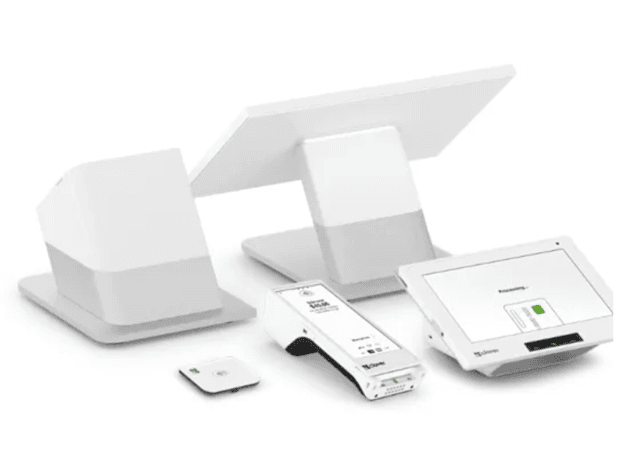
image of Clover’s POS hardware

With Clover’s wide range of hardware, you can create customized checkout stations. There is even a virtual terminal option so you can accept payments without any cards. Source: Clover.

We found Clover’s inventory management functions to be especially valuable. You can track items by a variety of criteria, like size or color. Plus, the system will automatically update your inventory as you scan items, and when stock is running low, you’ll get an immediate notification. We also like the built-in tools for promotions, discounts and loyalty programs that help encourage repeat business. Convenience store owners will especially appreciate the extensive app marketplace, which includes apps for accepting EBT payments, lottery payouts and age verification.

Clover sells retail systems as bundles that combine a software plan with hardware. The entry Basic bundle is a one-time hardware purchase with no separate monthly software fee; the higher tiers add a monthly charge.

PlanPriceFinancing OptionFeatures
Basic$349$16/month for 36 monthsCompact terminal with 3.6-inch touchscreen and built-in receipt printer
Standard$1,899 + $84.95/month$180/month for 36 monthsStation Duo POS, receipt printer and cash drawer
Advanced$2,648 + $104.90/month$240/month for 36 monthsStation Duo POS, Flex handheld POS, receipt printer and cash drawer

Payment processing starts at 2.3 percent + 10 cents per in-person transaction. Barcode scanners, scales and additional cash drawers are priced separately, and numerous other plans exist for different business types.

  • An all-in-one POS system that includes hardware, software and payment processing.
  • The software is intuitive and easy to train your employees on.
  • Clover offers many types of Clover offers many types of hardware devices, making it suitable for all sorts of configurations.devices, making it suitable for all sorts of configurations.
  • You must use Clover's proprietary hardware since third-party hardware options aren’t compatible.
  • Clover’s pricing structure is often confusing.
  • Clover is more expensive than other POS systems we reviewed.

We went through more than 2,400 customer reviews to see what users liked about Clover’s POS. Roughly 35 percent of the positive feedback centered on how easily the system can be set up and configured, with reviewers repeatedly saying that their staff needed little training — useful in a store with high turnover behind the counter. About 28 percent praised the hardware and the reliability of payment processing, particularly the mobile checkout experience. Another 22 percent highlighted the reporting, including real-time sales data and the ability to sync with accounting software such as QuickBooks. A consistent concern, however, was customer service response times.

GoDaddy logo
Editor's Rating: 9.2/10
Visit Site
Links to GoDaddy POS

GoDaddy is our pick for tracking sales so your convenience store can sell more and better. The central dashboard lets you easily manage online and in-person transactions. With useful analytics and reports, you’ll be able to make informed decisions on restocking hot items and discounting inventory that needs to move. Plus, you can get insights into customer buying habits to help guide promotional marketing campaigns through GoDaddy’s marketing tools, a standout feature we especially love.

image of Smart Terminal Duo and Flex

GoDaddy’s POS hardware is easy to set up as we discovered during our testing process. We were able to add several new inventory items quickly in minutes. Source: GoDaddy

We appreciate that every plan includes access to GoDaddy’s stellar tools for building and hosting websites, helping your store expand to e-commerce. The excellent sales tracking features include reports to see which items customers are purchasing online or in-store. You can also seamlessly integrate with any of GoDaddy’s other products. The standard POS software carries no monthly fee at all when paired with GoDaddy hardware, which keeps the entry cost low for a single-location shop.

GoDaddy keeps its POS pricing to two software tiers, with the difference between them showing up mostly in the processing rate and the size of your product catalog.

PlanPriceFeatures
Standard$0 per month with GoDaddy hardwareCore POS features, catalog setup, basic inventory tracking, 2.5 percent in-person processing, terminal catalog capped at 10 products
Point of Sale Plus$28.99 per month, billed annually2.3 percent in-person processing, unlimited terminal products, inventory stock alerts, Rate Saver surcharging, online ordering with in-store pickup, employee roles and permissions, unbranded digital receipts

Payment processing fees:

  • 2.5 percent with no per-transaction fee for in-person sales on the standard plan
  • 2.3 percent with no per-transaction fee for in-person sales on Point of Sale Plus
  • 2.7 percent + $0.30 for online transactions; 3.5 percent for keyed-in transactions

Hardware runs from free Tap to Pay on a compatible phone, through a $79 mobile card reader, to Smart Terminals at $275, $399 and $499 depending on screen configuration.

  • GoDaddy’s analytics and reporting excel at tracking sales to help stock and move inventory.
  • Subscriptions include access to GoDaddy’s website-building and domain-hosting features.
  • In-person processing has no per-transaction fee, which favors a store built on small baskets — on a $4 sale, a flat percentage costs less than a rate with a fixed cent charge attached.
  • The lowest processing rate and the lifting of the 10-product terminal cap both require paying for Point of Sale Plus annually.
  • GoDaddy requires you to use its own payment processing, so you can’t shop your rates elsewhere.
  • The integration library is small next to competitors, which matters if you need specialized lottery or EBT tooling.

GoDaddy has 4.4 out of 5 stars on Trustpilot across more than 144,000 reviews, but keep in mind that rating covers the company as a whole rather than the POS product on its own. The praise that came up most often is about support: reviewers described reaching knowledgeable people quickly, and the company responded to the majority of reviews, positive or negative. For a convenience store owner who may be troubleshooting at odd hours, that responsiveness is worth weighing alongside the feature list.

Toast logo
Editor's Rating: 9.5/10
Visit Site
Links to Toast

Convenience stores have become food businesses: the deli counter, the roller grill and the coffee station often carry better margins than the packaged goods on the shelves. Most retail POS systems treat prepared food as an awkward add-on. Toast handles a bag of chips and a hot sandwich in the same transaction, routing the food order to a kitchen display while the retail item simply rings up.

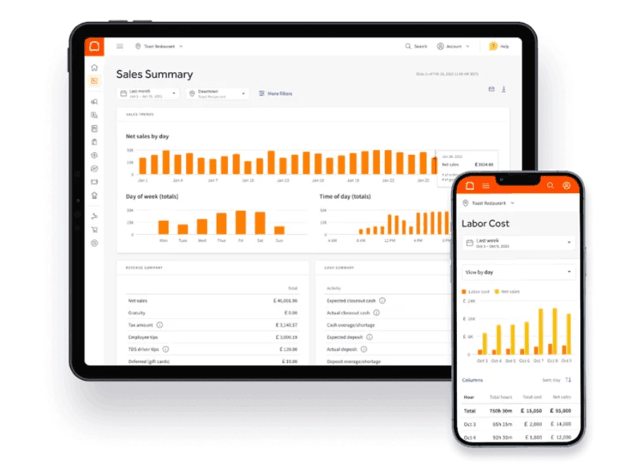
image of Toast’s Sales Summary dashboard

Toast’s Sales Summary can help spot sales trends, and also provides insightful reports. Source: Toast

The convenience-specific tooling is sound. A single barcode scan updates inventory and triggers an age-verification prompt on alcohol, which keeps a clerk from having to remember the rule during a rush. The system accepts EBT, supports self-checkout to keep the line moving and runs in offline mode when the internet drops, resyncing automatically once it returns. Multi-location owners can manage inventory, pricing and reporting for every store from one dashboard, and Toast IQ, the platform’s AI assistant, surfaces patterns in your own sales and labor data rather than generic benchmarks.

The newest piece is Toast Fuel, launched in September 2026, which brings pump transactions onto the same platform as in-store sales. A customer can prepay for gas, grab a coffee and a sandwich, and have it all ring up as one transaction, with fuel margins reporting alongside retail and food rather than sitting in a separate back-office system. Given that convenience stores sell an estimated 80 percent of the fuel American consumers buy, unifying the forecourt and the counter is useful — though it is new enough that there is little independent operator feedback yet.

Toast’s retail pricing is leaner than its restaurant pricing, and the difference matters: there is no free retail tier, so a convenience store cannot start on Toast the way a new restaurant can.

PlanPriceFeatures
Point of Sale (retail)$90 per monthChoice of hardware, cloud-based POS, custom hardware configuration
Build Your OwnCustom quoteConfigured around the products and capabilities your store needs, including fuel

Payment Processing Fees

  • Flat-rate fees vary; Toast requires you to use its own payment processing
  • Packaged goods and prepared food ring up in a single transaction, with food orders routed to a kitchen display — a genuine advantage for stores with a deli or hot food counter.
  • When the barcode on alcohol is scanned, it triggers an age verification prompt that reduces the compliance burden on staff.
  • Toast Fuel brings pump and in-store sales onto one platform, so fuel margins report alongside retail and food.
  • There is no free retail plan, unlike Square and GoDaddy, so the entry cost is higher than either.
  • Toast requires its own payment processing and approved hardware, which rules out reusing equipment you already own.
  • The retail and fuel products are much newer than Toast’s restaurant platform, with less operator track record.

Reviewing more than 1,800 customer accounts of the Toast platform, the major theme — roughly 87 percent of the positive feedback — was how little training the interface required. About 78 percent praised the feature set and how the pieces connect rather than needing to be stitched together, and roughly 71 percent highlighted the reporting, particularly sales and labor analysis. One caveat worth stating plainly: the overwhelming majority of this feedback came from restaurant operators, since Toast’s retail and convenience products are recent.

Shopify logo
Editor's Rating: 9.4/10

Shopify is our choice for a POS system that allows your convenience store to seamlessly take online orders. The system offers unique omnichannel selling tools so you can reach customers in a variety of ways, like your website, social media, Google and other digital marketplaces. We love that customers can choose to pick up items or have them delivered, and if you’ve got multiple locations, the platform automatically selects the nearest store with the item in stock for shipment.

 image of a person using a Tap To Pay option available from Shopify POS

With Shopify POS, your customers can use a Tap To Pay option that works through iPhone and Android mobile devices. Source: Shopify

We found Shopify’s customer relationship management function to be especially useful. Unique customer profiles based on past in-store and online purchases allow you to offer relevant products no matter where customers are shopping. Plus, you can send personalized coupons, promotions and gift cards for use online or in person. We love that Shopify lets you create in-store QR codes, so when customers see a product they might be interested in later, they can scan the code and save it for online purchase down the line.

Shopify prices its plans around the online store, with in-person selling layered on top. POS Lite is included with every plan; the retail features most convenience stores would want sit in the POS Pro add-on.

PlanPriceFeatures
Starter$5 per monthSocial and messaging selling with POS Lite; not a full online store, and transaction fees are the highest of any plan
Basic$39 per monthFull online store, POS Lite, unlimited registers, unified inventory, 24/7 chat support
Grow$105 per monthEverything in Basic, plus five additional staff accounts and discounted shipping rates
Advanced$399 per monthEverything in Grow, plus 15 additional staff accounts and custom reporting

POS Pro costs $89 per month per retail location, or $67 per month billed annually, and is not available on the Starter plan. It adds unlimited staff roles and permissions, in-store pickup and flexible delivery, and customer loyalty insights.

  • Shopify lets you conveniently sell and track inventory over multiple channels.
  • Customer profiles help you promote products based on consumer preference.
  • Inventory stays unified across every location, so a multi-store operator can see stock in one place rather than reconciling counts by hand.
  • The best omnichannel selling features require adding POS Pro to your plan, which may incur an additional monthly charge per location.
  • You pay an extra transaction fee if you don’t use Shopify Payments.
  • The three-day trial is the shortest on this list, leaving little time to test the system against a week of sales.

Across more than 850 customer reviews we examined, the strongest theme — appearing in roughly 89 percent of positive feedback — was how cleanly the online and in-person sides stay in sync, with inventory, orders and customer records updating across channels in real time. About 85 percent of positive reviews cited the system’s ease of use, with several users reporting they trained staff in half an hour. Another 78 percent pointed to inventory management and the mobile app, which reviewers found useful for pop-ups and off-site selling. The criticism centered mostly around cost: plan fees, POS Pro per location and third-party apps added up faster than the headline price suggested.

Square logo
Editor's Rating: 9.1/10

Square is a great choice for getting a new convenience store up and running quickly. The free plan includes everything you need to start selling, like basic inventory tracking for unlimited items and a built-in online store. There’s no monthly fee, and payment processing rates are affordable.

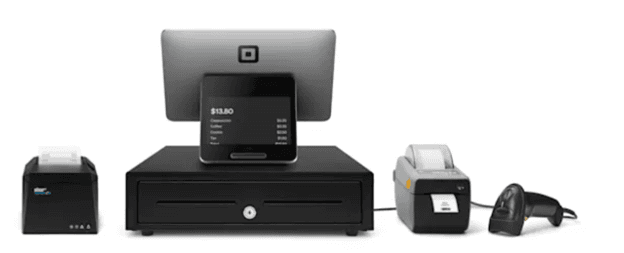
image of Square’s complete retail POS kit

Square can offer you easy-to-use mobile credit card readers as well as other hardware like its complete retail POS kit. Source: Square

You’ll also have access to several hardware options, so you can choose what fits your budget. The free plan even lets you create customer profiles, which helps you understand your shoppers and offer personalized deals to encourage customer loyalty.

We also like how intuitive Square is to use and train your staff on. As your store grows, you can upgrade to a paid plan for more advanced features and lower payment processing fees. You can include paid add-ons, like email marketing and payroll features, without switching plans. This flexibility makes Square an excellent long-term option for convenience stores.

Square runs three tiers. The free plan is free — there is no monthly software cost — with the paid tiers buying advanced tools and progressively lower in-person processing rates.

PlanPriceIn-person processing
Square Free$0 per month2.6 percent + $0.15
Square Plus$49 per month per location2.5 percent + $0.15
Square Premium$149 per month per location2.4 percent + $0.15

Manually entered transactions run 3.5 percent + $0.15 on every plan. Hardware starts at $59 for the Square Reader, with the Stand and Kiosk at $149 each, the Terminal at $299, the Handheld at $399 and the Register at $899. New accounts may qualify for one free magstripe reader.

  • Square’s free plan gets new stores up and running with basic POS functions and affordable payment processing.
  • Paid plans include advanced tools for managing inventory, employees and customers.
  • If you lose your Wi-Fi connection, you can continue accepting payments in offline mode for up to 24 hours.
  • You can’t use a third-party payment processor.
  • 24/7 phone support is limited to Square Premium customers.
  • Some advanced POS and inventory features require a paid plan.

Square had the largest amount of feedback of any system here — we looked at more than 8,200 customer reviews. Around 92 percent of the positive comments concerned how straightforward the system is to set up and run, with many users noting they configured it themselves rather than hiring help. Roughly 89 percent cited the pricing, specifically the absence of a mandatory monthly fee, though several reviewers found the tiered processing rates less intuitive than they first appear. About 85 percent valued having inventory, online selling and in-person sales in one place. Complaints focused on customer service and on account restrictions.

Costs of POS Systems for Convenience Stores

You want a POS system that helps your convenience store, not one that holds it back with high costs and fees. To find an affordable solution that gives you all the POS features you need without breaking the bank, you’ll need to consider three separate costs.

  • Hardware costs: It can be a significant upfront expense, but finding the right hardware is key to ringing up sales and taking payments. Many providers include basic POS hardware with a subscription, but spending more on a robust device is a better bet. Expect to pay anywhere from a few hundred to a few thousand dollars. Convenience stores need accessories, like barcode printers and scanners, swipe cards, scales, receipt printers, and cash drawers. Look for a solution that includes these in your subscription or offers affordable add-on options. A POS system that allows you to use third-party hardware is a great way to save money.
  • Subscription fees: If your shop is still getting on its feet, look for a provider that offers a basic free plan. As your store grows and requires advanced functionality, you can find an appropriate solution from the tiered service plans offered by most providers. Prices range from $10 to a few hundred dollars per month. You might need to pay more for advanced inventory management, reporting and analytics, customer relationship management, and staffing add-ons. Not all POS system providers are upfront about pricing, so call to get the exact rate for your store.
  • Payment processing rates: Credit card processing fees can be complex, so make sure you understand how you’ll be charged for different transactions, like in-store or online. Some companies charge a flat rate, whereas others offer custom quotes based on your store’s characteristics. If you want to cut costs, shop for a POS system that permits third-party payment processing.

Features of POS Systems for Convenience Stores

Beyond efficient customer checkout, your POS system should include features to help your shop thrive, like tools to let you know what to stock and how to bring in customers. Here are the features we think a POS system for convenience stores should include.

Inventory management

While POS inventory management tools don’t always come standard, we think they are an essential feature for keeping your store stocked and selling. Many systems will automatically update inventory as you scan items at checkout and when they are purchased online. Timely alerts let you know what you’re running low on so you can get them quickly back in stock. The best solutions allow you to track items by a variety of criteria, like color, size or function.

TipBottom line
Effective inventory management requires finding the right balance of stock to keep on hand. Managing your inventory well will increase your store’s profitability.

Hardware options

We may be moving towards a cashless society, but many people still rely on paper money to make quick purchases at the local corner shop. That means you need a POS system that can handle any kind of payment. A durable, secure POS register is key. You’ll most likely need a cash drawer and a receipt printer. Depending on your needs, you’ll also want barcode scanners and weight scales to help you speedily ring up customers. Some accessories connect via USB and others via Bluetooth, so make sure your devices are compatible.

External integrations

A POS system that integrates with useful business solutions, like the best accounting software, can help you run your store smoothly and accurately. You should also look for a provider that integrates with third-party apps designed specifically for the needs of your type of store. If you sell alcohol or tobacco products, you’ll need an age-verification app. Integrations for lottery verification and payouts might also be necessary.

E-commerce

From over-the-counter cold remedies to birthday party supplies, consumers increasingly rely on online ordering when they can’t make it to the local corner shop. Look for a solution that helps you reach more customers in more places, including social media, Google and other online marketplaces. Some POS systems even include website-building tools and delivery services. Be sure to check card processing rates for online purchases, as they are often higher than in-person rates.

Payment processing

Regardless of how your customers pay, you’ll want a service that processes payments quickly and affordably. While most POS systems accept all kinds of payments, your convenience store might need a solution that also accepts EBT cards, which could call for a third-party app. While some providers require using their payment processing service, you could save by finding one that allows third-party credit card processing software. Pay attention to deposit times, as you don’t want your store to run out of cash on hand.

Did You Know?Did you know
A Bluevine survey of 774 small business owners found that 38.7 percent don’t have enough cash on hand to cover a month of operating expenses in an emergency. Follow these cash flow strategies to keep cash on hand and help your business survive.

Customer management

When consumers go out to make a convenience store purchase, you want them to think of your store first. Stocking the right products is only the first step. A good POS system will help you understand your consumers so you can target them with relevant deals and build customer loyalty. Some platforms offer customer databases to track past purchases, highlight preferences and offer personalized service in-store and online. Many solutions offer tools to create customer loyalty programs, like reward points, gift cards and coupons, to incentivize your customers to keep coming back.

Reporting and analytics

Most POS systems include basic reporting functions, but since your store sells a variety of items, you’ll want to find a solution that offers robust POS sales reports. Timely and accurate insights will help keep your shop stocked and products moving. Look for analytics that show you which items are hot and which are seasonal favorites so you can always offer your customers the products they want at the right time.

Employee management

Many POS systems offer basic employee management tools or add-on features. You can create individual codes for clocking in and out, with custom permissions so only certain staff can do things like process returns or void items. Some POS providers even offer employee swipe cards for a fee. You can also use the software to create schedules to make sure you’ve got all hands on deck at your busiest times. Plus, you can track sales by employee to see which team members excel on the shop floor.

Marketing tools

While not a common feature in POS systems, we found the providers that offer marketing tools to be especially useful for convenience stores. The right tools can help you find and connect with your target customer base. Through marketing email campaigns, you can build awareness of your store and offer relevant promos and discounts to bring in more customers.

Customer support

Convenience stores often have long hours, so you’ll want to find a provider that offers reliable customer support at any time day or night. While many offer a host of useful online resources, we think your best bet is always speaking directly with a customer service rep who can walk you through any issue. Since you can’t always be at your store, it’s important that the service is easy to reach for all your employees.

Choosing a POS System for Convenience Stores

These steps will help you decide which POS system will most benefit your convenience store.

1. Determine your needs.

Before you start shopping for a POS system, you should take a look at the specific needs of your convenience store. The size of your store and the products you sell will shape the type of solution that’s right for your shop. Consider upfront and monthly costs, as well as the features that will best help you run your business. If expanding is part of your business plan, be sure to look for a solution that will grow with your store.

2. Research the market.

Once you know what you need to get out of a POS system, it’s time to start researching the solutions on the market. Having a clear idea of the functionality you require will help you narrow down your choices, but it’s a good idea to go beyond visiting vendors’ websites. Read guides and reviews to see how stores like yours evaluate their experience with POS systems. It’s also a good idea to talk to similar businesses in the area to learn what solutions work for them.

3. Speak to a sales rep.

Some POS providers don’t provide pricing on their website and others require custom packages, so you might have to contact a sales rep to get an accurate idea of the final price and features included. Even if pricing is transparent, you should still contact the vendor to find out about discounts and schedule a demo run or a free trial.

4. Compare the options.

After you’ve informed yourself about the pricing and features of top POS systems and given a few a test drive, you have to evaluate the options and determine which is the best fit for your convenience store. Read the fine print to ensure there are no hidden fees for things like online orders or deliveries. It’s a good idea to choose a solution that lets you add more devices and features as your store grows.

Bottom LineBottom line
A POS system is a smart investment, whether your shop is just starting out or you’re opening up a franchise of an established chain. Take the time to research and compare the different solutions on the market to find the best one to help your business succeed.

Advantages of POS Systems for Convenience Stores

These are the main reasons why using the right POS system will benefit your convenience store.

  • Stock and sell better: Your store’s success depends on having products that customers want in stock and priced better than the competition. POS inventory tracking and reports will help you see which items are popular so you can always have them on hand. You can also see which items might need a sale or promotion to move them off the shelf.
  • Keep customers coming back: Customers have a ton of options when it comes to purchasing convenience items, so you need to give them a reason to come in the door and keep coming back. POS systems help you understand your consumers’ tastes and preferences so you can provide them exactly what they want. Customer loyalty tools allow you to offer personalized deals, coupons and rewards so shoppers will always have an excuse to pop in.
  • Create an online presence: Keeping foot traffic coming through the door is essential, but people increasingly rely on online shopping for convenience purchases. Many POS systems have tools to let you expand into e-commerce, whether it be a web page or a social media shop, so you can reach your customers wherever they are. While it might be hard to beat the prices of some of the big online sellers, consumers will feel good about supporting a local business, especially one that will deliver essential goods right to their door.
  • Use helpful tools: Convenience stores face challenges that many other businesses don’t. From preventing employee theft to selling regulated items, like lottery tickets and tobacco, POS systems offer add-on tools and integrations to help you run your store more efficiently.

What Are Some Alternative POS System Options?

Our five picks cover most convenience store setups, but the systems below are worth considering if none of the ones above fit your business.

Epos Now

Epos Now offers a flexible option. It works with third-party hardware, third-party software and third-party payment processing, so you can assemble a setup from equipment you already own and shop your processing rates rather than accepting the vendor’s. The core POS covers inventory and employee management, and you can tighten security with individual employee ID codes and custom permissions for voids and refunds. The trade-off is pricing: nothing is published, so you will need a quote, and that might come with a long-term contract and a support subscription. Read our Epos Now review to learn more.

National Retail Solutions

National Retail Solutions is built for bodegas, corner shops and independent convenience stores. Pricing starts at $19.95 per month when bundled with NRS Pay, the company’s processing service, with hardware from $599 on the same bundle. The convenience-specific tooling is the draw: pre-programmed UPCs that spare you entering a shelf full of packaged goods by hand, the BOSS Club loyalty program, and SMS receipts and license ID scanning on the $49.95 Advanced tier. Contracts are month to month with a 30-day trial, and support runs seven days a week in English, Spanish, Hindi and Arabic. Integrations are limited and carry added fees.

Lightspeed

Lightspeed is the one to look at if inventory is your concern. Its retail plans run from $89 per month on an annual contract and are built around managing large catalogs, with bulk uploads, supplier catalog access and stock alerts that hold up across multiple locations. For a single corner shop it is more system than you need; for an operator running several stores with thousands of SKUs between them, it is the strongest inventory tool among these options. See our Lightspeed review for the full breakdown.

Methodology

To determine the best POS systems for convenience stores, our team of sales experts and software analysts began with an initial list of 112 POS platforms spanning every industry, then narrowed it to 14 for closer research. We cast deliberately wide, looking past the best-known names to smaller vendors built specifically for corner shops and bodegas, before selecting our five recommendations.

Our evaluation concentrated on what a convenience store actually asks of a register. We looked for barcode and scale support, since a store sells both scanned packaged goods and weighed items. We assessed age verification for alcohol and tobacco, EBT handling and lottery integrations, all of which are routine here and absent from most general retail systems. We tested how each platform handles a short basket at speed, how it manages cash alongside cards, and whether it keeps running when the internet drops. On the back end, we weighed inventory tools against the reality of a few thousand low-margin SKUs, and looked for analytics that surface both sell-through and shrink.

These factors were weighted differently in our overall conclusion. The weights were determined based on how much business owners prioritize these criteria when shopping for business software and services and making purchasing decisions.

  • Pricing (30 percent): We compared each vendor’s plans and judged which offered the best value, accounting for monthly software fees, credit card processing rates, hardware costs and the price of add-ons like loyalty programs and age-verification tools. We paid particular attention to how per-transaction fees behave on small baskets.
  • Features (25 percent): We looked for core convenience store functions including inventory management, customer management, employee management and reporting, and awarded extra points for age verification, EBT acceptance, lottery support and e-commerce tools.
  • Ease of use (25 percent): We tested the hardware and software ourselves, gauging the learning curve and customization options, with weight given to how quickly a new clerk can be trained and how the interface performs during a rush.
  • Customer service (20 percent): We evaluated the range of support options, including whether phone assistance is available on every tier and whether support hours match the long trading days convenience stores keep, along with each vendor’s self-guided resources.

Based on these criteria, we determined not only which convenience store POS systems our readers could trust but also the ways in which each best serves a different kind of store. Those takeaways informed the “Best for” use cases you see on this page.

To learn more about our methodology, see our full editorial process.

POS Systems for Convenience Stores FAQ

If your store plans to accept credit cards and cash payments, you’ll need both a cash register and some form of POS system. The best POS systems provide your store with additional benefits and features.

POS prices vary depending on the provider and level of service. Some POS systems include a cash drawer, but most of the time, you’ll have to buy one. POS subscriptions range from free to a few hundred dollars per month. An average cash register will set you back about $100 to $200.

If you’ve got a tiny shop, you might be able to get by without a POS system. However, a good POS system can help you process payments more affordably, keep track of inventory and build customer loyalty.

There are many POS systems on the market, and the right solution depends on the specifics of each individual store. Clover, Shopify, Toast, GoDaddy and Square are some of the top POS providers on the market.

Yes. Square offers a basic free POS plan. You pay for hardware and payment processing fees only.

Jeremy Bender contributed to the reporting and writing in this article.

Did you find this content helpful?
Verified CheckThank you for your feedback!
Tom Anziano headshot
Written by: Tom Anziano, Senior Writer
Tom Anziano is an international business expert with a bachelor of business administration from the University of Miami, where he concentrated on marketing. Over the last two decades, he has shared his expertise domestically and abroad, including as a business skills and writing teacher in Madrid. At business.com, Anziano primarily covers marketing topics, including social media trends, marketing analysis, and email and text message marketing. Anziano also has experience testing business software and services, allowing him to make informed recommendations on the best products and tools for business owners. He specializes in CRM software, email and text message marketing platforms, and financial solutions.